- tips & tricks
- |By Aleksey Haritonenko, Last Updated:
Sellfy vs Shopify: I built the same store on both
- Sellfy is the faster setup. A PDF ebook took 7 steps and a hoodie 8, with no apps. On Shopify they took 13 and 11 steps, plus two apps.
- Sellfy starts at $29/mo ($22/mo billed yearly) and takes no cut of your sales. Shopify Basic starts at $39/mo ($29/mo billed yearly).
- Sellfy stays cheaper up to about $16,000 a year in sales. Past that, Shopify Basic costs less.
- Shopify wins on physical stock, in-person sales, design control and its 16,000+ app store.
"Shopify's $39/mo + apps + dev time is overkill for selling 3 PDFs."
Is that true? I wanted to find out.
I set up the same products on both platforms myself on November 25, 2026. I counted every step and took prices from each company's own pricing page.
Sellfy or Shopify: the short answer
Choose Sellfy if you sell digital products or print-on-demand merch to an audience you already have. Choose Shopify if you sell physical stock, sell in person, or need a big app store. On cost, Sellfy is cheaper up to about $16,000 a year in sales. Above that, Shopify Basic is cheaper.
In my test, a PDF ebook took 7 steps on Sellfy and 13 steps plus an app on Shopify. A print-on-demand product took 8 steps on Sellfy. On Shopify it took 11 steps, the Printful app and a second account.
Sellfy vs Shopify at a glance
Sellfy is built for creators and includes digital delivery and print-on-demand. Shopify is built for all kinds of online stores and adds most creator features through apps. Shopify is cheaper at higher sales and gives more free emails on its entry plan. Sellfy has a longer free trial and fewer setup steps.
| Sellfy | Shopify | |
| Built for | Creators selling digital products, print-on-demand and subscriptions | Online stores of every size, mostly physical goods |
| Starting price (monthly billing) | $29/month (Starter) | $39/month (Basic) |
| Starting price (yearly billing) | $22/month | $29/month |
| Free trial | 14 days, no credit card | 3 days, then $1/month for 3 months |
| Platform cut of your sales | None | None with Shopify Payments; 2% on Basic with a third-party card provider |
| Payments | Stripe and PayPal, paid to your own accounts | Shopify Payments, PayPal or a third-party provider |
| Digital downloads | Built in, files up to 10–20 GB by plan | Through an app (Shopify's free Digital Products app) |
| Print-on-demand | Built in, 11 fulfillment centers | Through an app (I used Printful) |
| Email marketing | 2,000 / 10,000 / 50,000 email credits a month by plan | 10,000 free emails a month, then $1 per 1,000 |
| Abandoned cart recovery | Business plan and up | All plans |
Sources: Sellfy pricing, Shopify pricing and Shopify Messaging, checked November 25–26, 2026.
What is Sellfy?
Sellfy is a store builder for creators. You upload a product, set a price and share your store link. Sellfy handles checkout, file delivery, print-on-demand and email marketing. It has run since 2011, and 75,000+ creators have sold over $165 million with it.
Sellfy is not a marketplace. It doesn't send shoppers to your store. You sell to the audience you already have on Instagram, YouTube, TikTok or your email list.
Sellfy is the store builder behind 75K+ creators. One flat monthly fee, and no commissions on your sales.
I built the same store on Sellfy and Shopify
I set up the same two product types on both platforms: a PDF ebook and a print-on-demand item. Sellfy needed 15 steps and no apps. Shopify needed 24 steps, two apps and a separate Printful account. A step is any screen or action between the dashboard and a product that's ready to sell.
Selling a PDF ebook: 7 steps vs 13 steps and an app
On Sellfy, a digital product is the first product type you see. I added a name and price, uploaded the PDF and published. That took 7 steps and no apps.
Each file also has a PDF stamping option. It adds the buyer's email to the PDF.
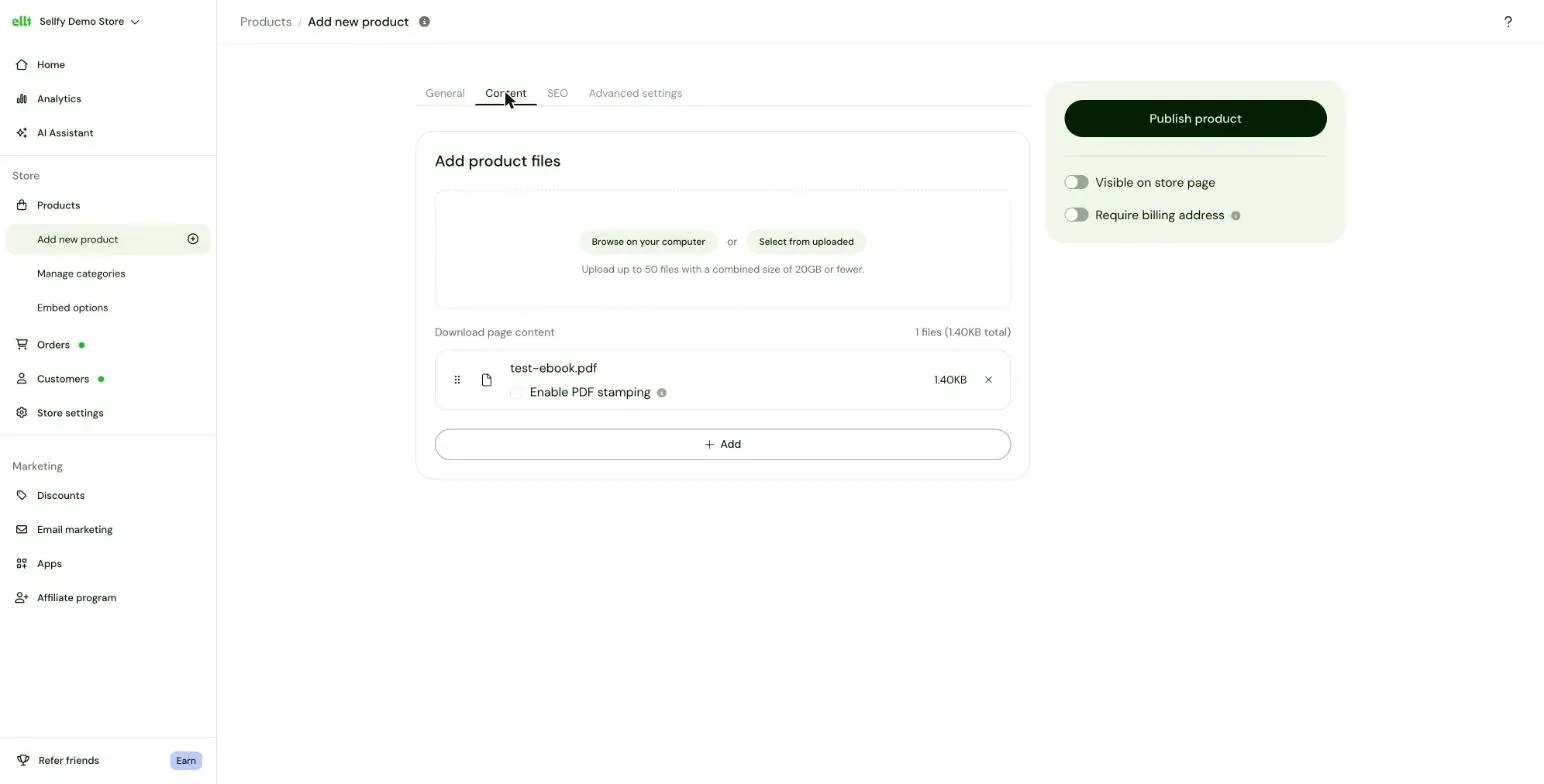
On Shopify, the product form has no field for a file. First, I had to switch off inventory tracking and the "physical product" setting. Then I installed Shopify's own Digital Products app. It's free and rated 4.8 stars from 1,521 reviews.
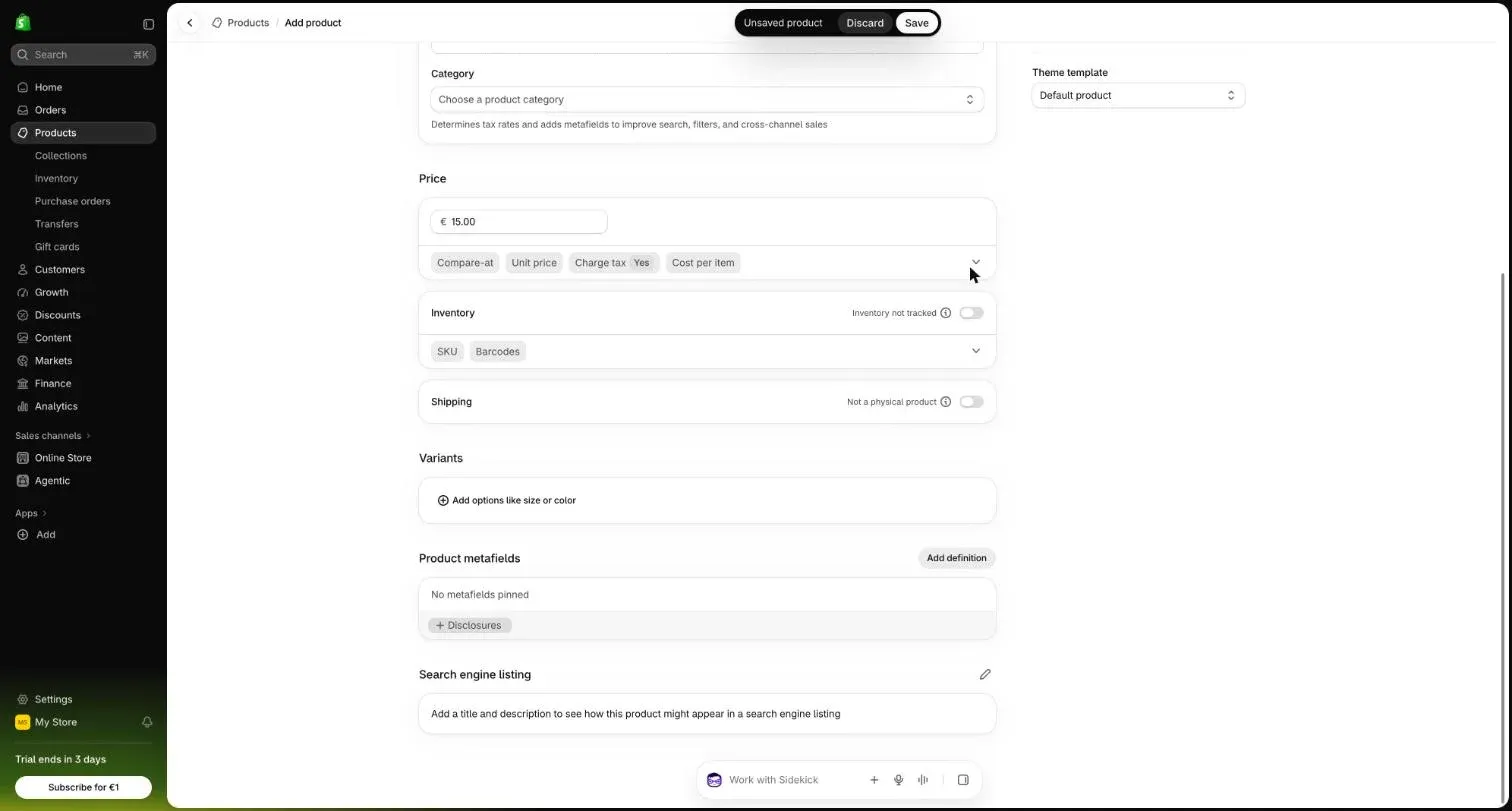
Next, I opened the app, found my draft product and added the file there. That took 13 steps.
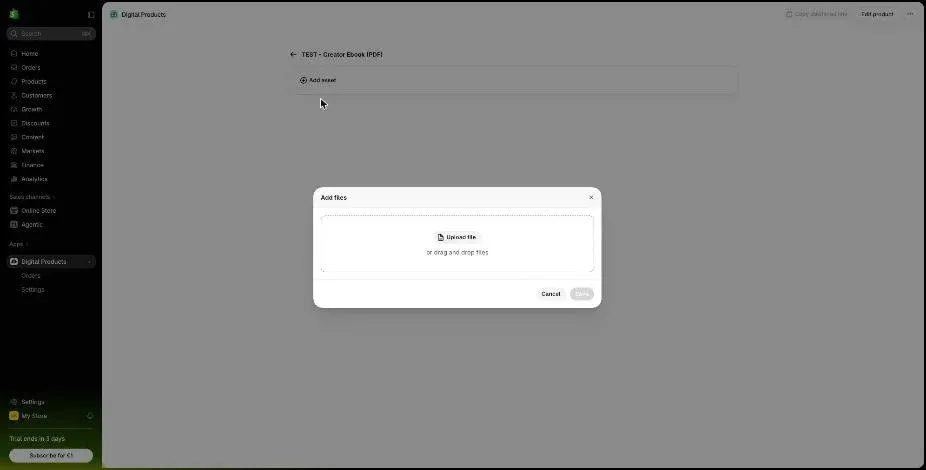
Neither process is hard. The difference is where the file lives. On Shopify, it sits in a separate app with its own screens and settings.
Selling a print-on-demand item: built in vs Printful
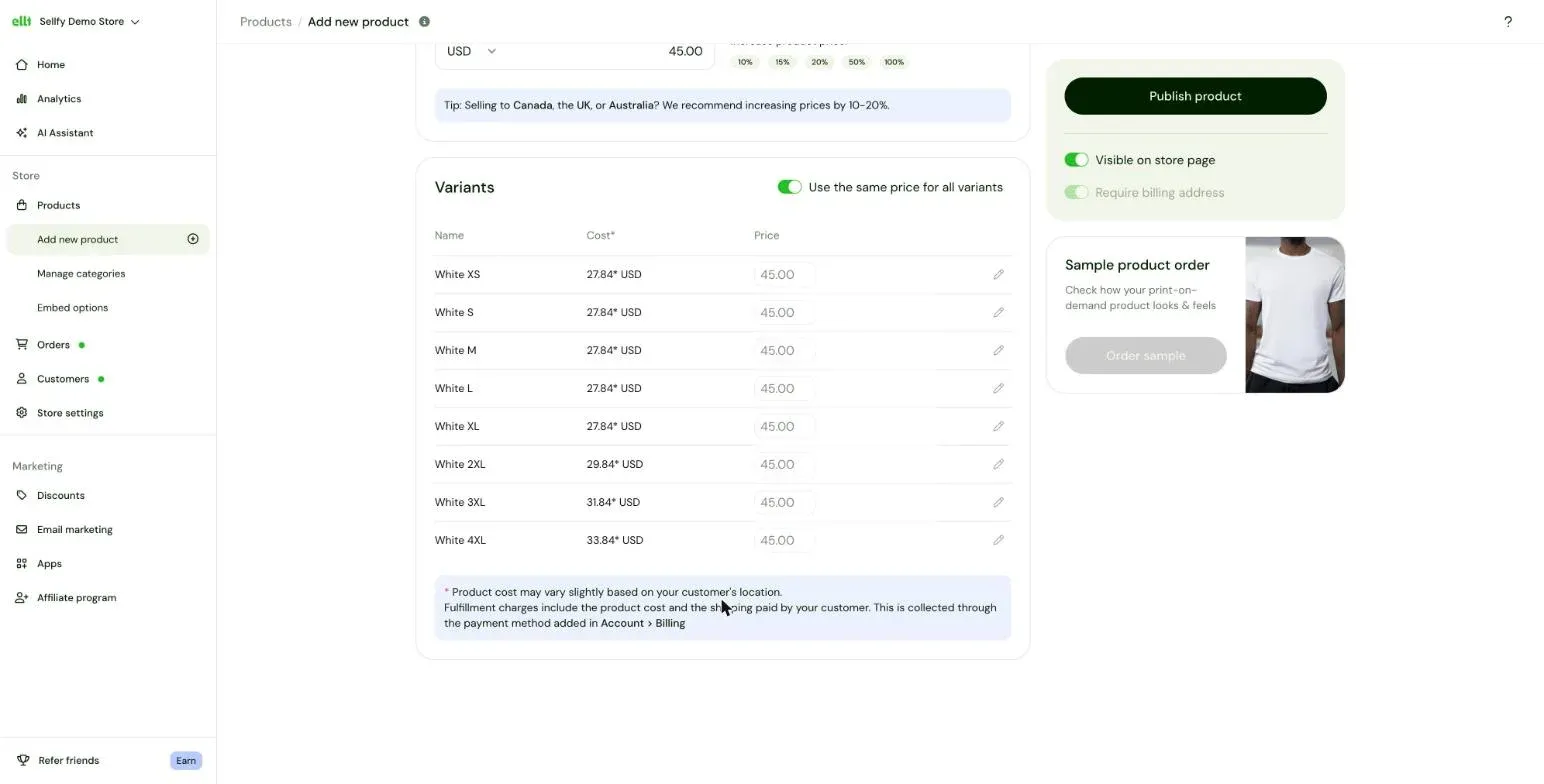
On Sellfy, print-on-demand is part of the dashboard. I picked a hoodie and uploaded my design. Sellfy made the mockups on its own. That took 8 steps, no apps and no second account.
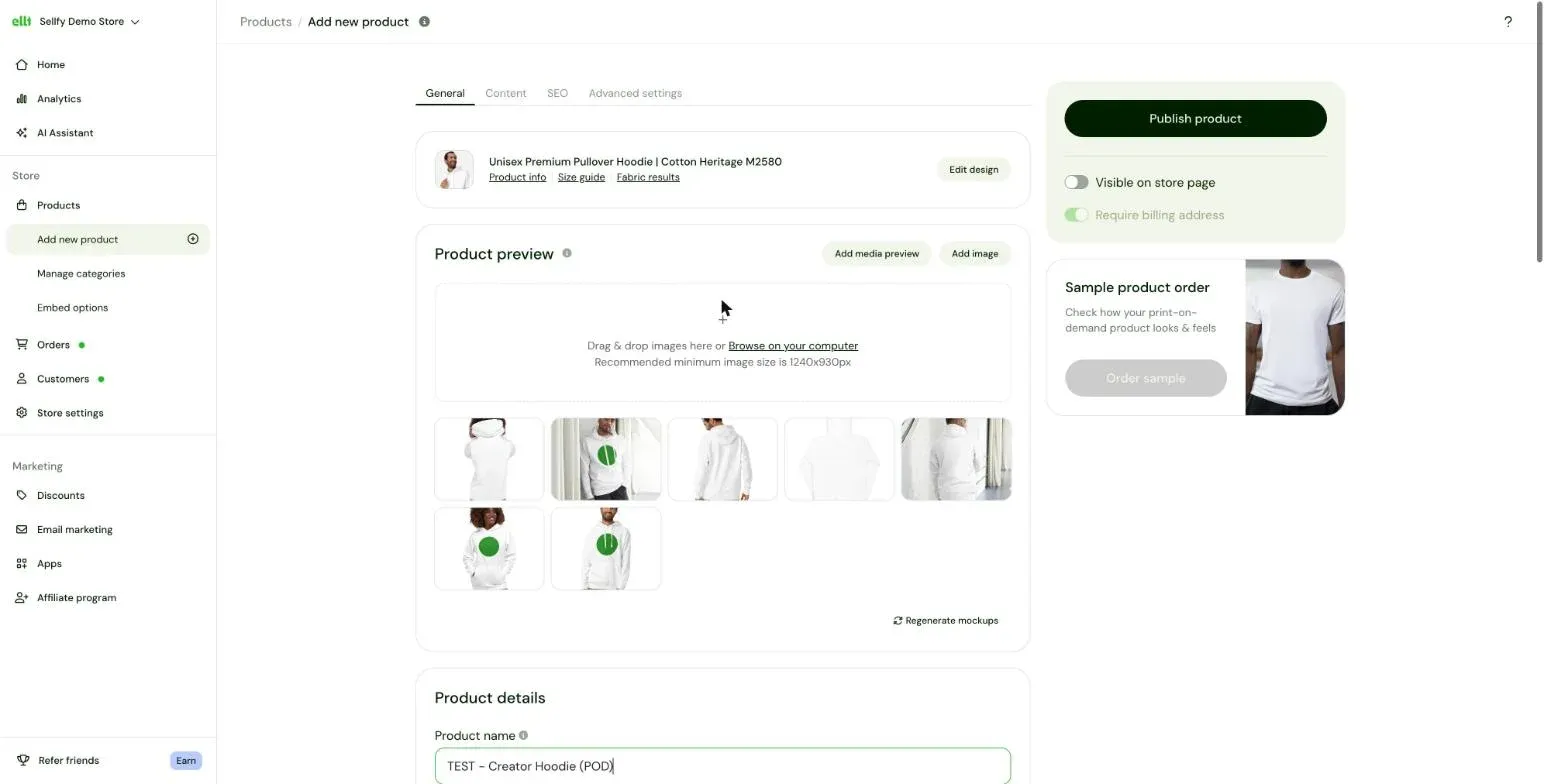
Sellfy showed a production cost of $27.84 to $33.84 per hoodie, depending on size. It suggested a price of $45.
On Shopify, I installed the Printful app. Printful asked me to create a separate account, fill in a survey and add billing details. Only then could I design a product. That took 11 steps across two accounts.
Printful started me on a T-shirt, not a hoodie. The cost was about $24.70, and the default price was about $27.18. My test store was set up in the EU, so I converted Printful's euro prices to dollars.
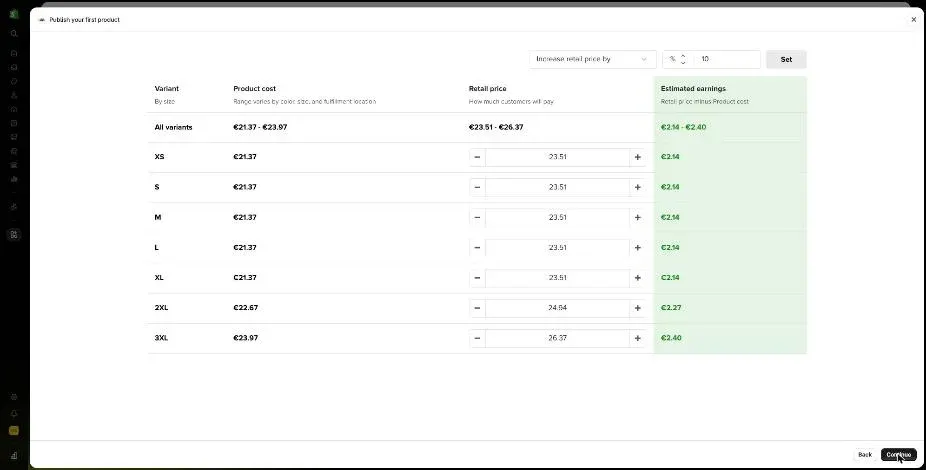
Printful is free to use and charges only when an order comes in. The trade-off is a second account, a second bill and a second support team.
Sellfy fees vs Shopify fees: what you actually pay
Sellfy starts at $29 a month and Shopify at $39 a month on monthly billing. Sellfy takes no cut of your sales. Shopify takes none if you use Shopify Payments. Card processing costs the same on both: 2.9% + 30¢ per US online sale.
Monthly plans side by side
Here are the plans as listed on November 25, 2026.
| Sellfy | Monthly billing | Yearly billing |
| Starter | $29 | $22/month |
| Business | $79 | $59/month |
| Premium | $159 | $119/month |
| Shopify | Monthly billing | Yearly billing | Online card rate (Shopify Payments) |
| Basic | $39 | $29/month | 2.9% + 30¢ |
| Grow | $105 | $79/month | 2.7% + 30¢ |
| Advanced | $399 | $299/month | 2.5% + 30¢ |
Shopify Plus starts at $2,300 a month. See the Sellfy pricing page and our Shopify pricing guide for more detail.
Fees on each sale
Sellfy takes no cut of your sales on any plan. Stripe or PayPal processing fees apply. The money goes straight to your own Stripe or PayPal account. Stripe's standard US rate is 2.9% + 30¢ per online card payment.
Does Shopify charge transaction fees? Not if you use Shopify Payments. It charges 2.9% + 30¢ on Basic. With a third-party card provider, Shopify adds 2% on Basic, 1% on Grow and 0.6% on Advanced.
PayPal orders skip that extra fee only while Shopify Payments is active and processing your card payments. If a third-party provider handles your cards, or Shopify Payments can't take payments, the fee applies to PayPal orders too.
Shopify Payments is available in about 40 countries and regions, including the US, UK, Canada, Australia and most of Europe. Brazil is not on the list. If your country isn't listed, you need a third-party provider and pay the extra fee on every sale.
What happens when you pass Sellfy's yearly sales limit
Sellfy's plans have a yearly sales limit that rises with the plan. Shopify has none. Every Google AI Mode answer I checked said Sellfy forces you to upgrade. It doesn't.
When you pass your limit, Sellfy notifies you and asks you to upgrade. If you don't, Sellfy may charge 2% on the revenue above the limit. Your store keeps selling and is not suspended.
Your real monthly bill at $500, $2,000 and $5,000 a month
I worked out the full monthly bill at three sales levels. I assumed a $25 average order, US card payments and monthly billing. For Shopify, I used Basic with Shopify Payments and the free Digital Products app.
For Sellfy, I show two options. One is the plan whose limit covers your sales. The other is a smaller plan plus the 2% fee on the sales above its limit.
| Monthly sales | Card processing | Sellfy: plan that covers your sales | Sellfy: smaller plan + 2% | Shopify Basic |
| $500 | $20.50 | $49.50 (Starter) | – | $59.50 |
| $2,000 | $82 | $161 (Business) | $134 (Starter) | $121 |
| $5,000 | $205 | $364 (Premium) | $301 (Business) | $244 |
At $500 a month, I found Sellfy is $10 cheaper. On monthly billing, Sellfy stays cheaper up to about $16,000 a year. On yearly billing, the line is about $14,000. Past that, Shopify Basic is cheaper.
What does the extra money buy on Sellfy? File delivery with PDF stamping, built-in print-on-demand with automatic mockups, and no apps to set up. If you're happy running a few apps, Shopify gets cheaper as you grow.
Sellfy is the store builder behind 75K+ creators. One flat monthly fee, and no commissions on your sales.
Can you sell digital products on Shopify?
Yes, with an app. Shopify's product form has no file upload, so you add Shopify's free Digital Products app. You attach a file or link, and buyers get a link to download it. You can also limit downloads. In my test, it added one app and six extra steps compared with Sellfy.
Shopify's own app doesn't list PDF stamping or license keys. For those, you'd add a third-party app from the Shopify App Store.
What you can sell: digital, print-on-demand, physical and subscriptions
Sellfy sells digital downloads, print-on-demand products, physical products and subscriptions from one dashboard. Shopify sells physical products out of the box and adds digital and print-on-demand through apps. If most of your business is physical stock, Shopify is the stronger fit.
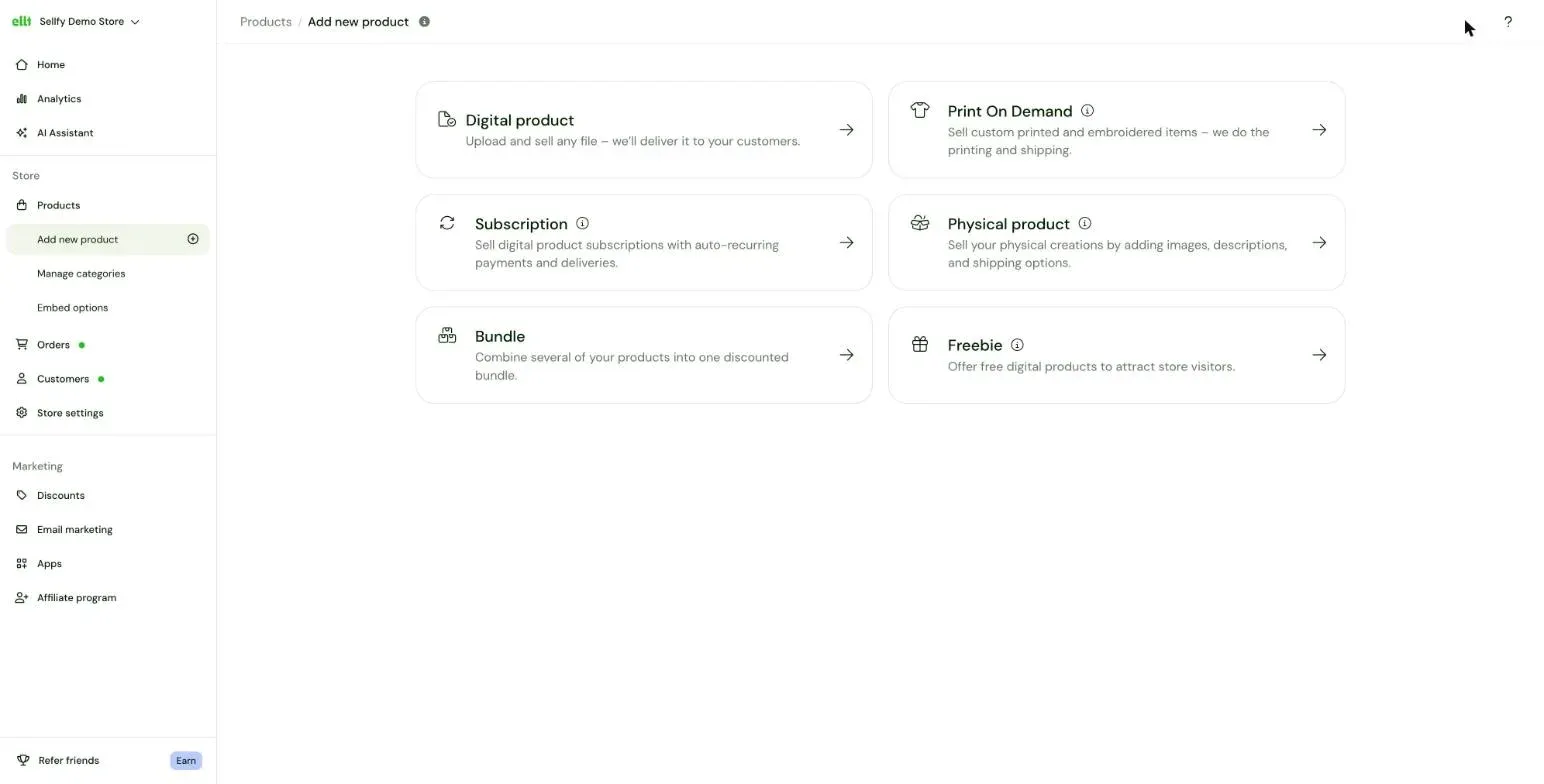
On Sellfy, creators sell ebooks, templates, presets, music, video files and software with license keys. Each product holds up to 50 files. Upload limits are 10 GB, 15 GB or 20 GB, depending on the plan.
Shopify is built around inventory, shipping and fulfillment. It also supports in-person sales with Shopify POS.
Marketing tools: email, discounts and cart recovery
Both platforms have email marketing and discount codes. Shopify gives more on its cheapest plan: abandoned checkout recovery and 10,000 free emails a month. Sellfy Starter comes with 2,000 email credits a month. Cart recovery, upselling and an affiliate program start on Sellfy's Business plan.
Higher Sellfy plans include 10,000 or 50,000 email credits a month. You email buyers from the same dashboard. Sellfy discount codes are percentage-based.
Shopify's email tool, Shopify Messaging, sends your first 10,000 emails each month free. After that, it costs $1 per 1,000 emails. For affiliates, Shopify has the Shopify Collabs app, which is free to install.
Sellfy integrations and Shopify apps
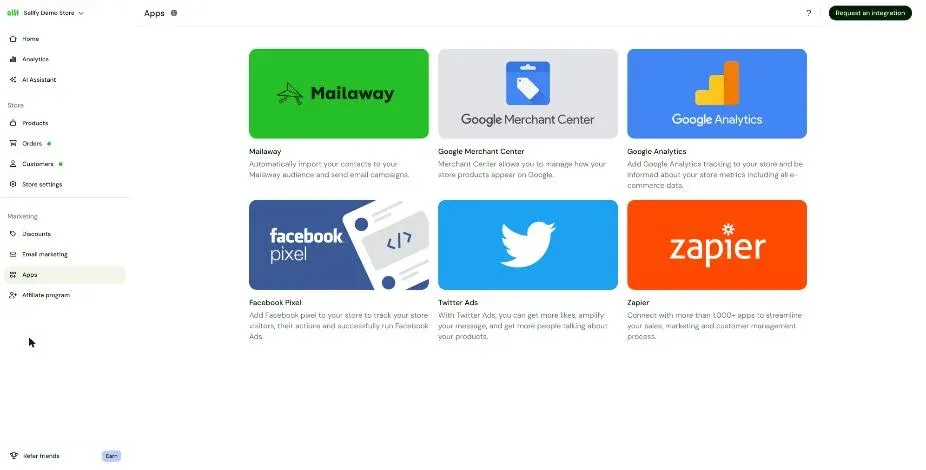
Shopify has the far bigger app store, with 16,000+ apps. If Shopify lacks a feature, there's usually an app for it. Sellfy builds most features in and connects to the rest. Sellfy integrations include Zapier, Google Analytics, Facebook Pixel, Google Merchant Center, webhooks, a public API and an MCP server.
The trade-off with Shopify apps: each one adds its own settings, and many charge a monthly fee.
On Sellfy, the MCP server lets AI assistants like Claude and ChatGPT work with your store. Our guide to MCP for ecommerce explains how it works. Mailaway, Sellfy's separate email app, connects from the Apps page. You can also embed a buy button, a product card or your whole store on your own website.
Design and customization
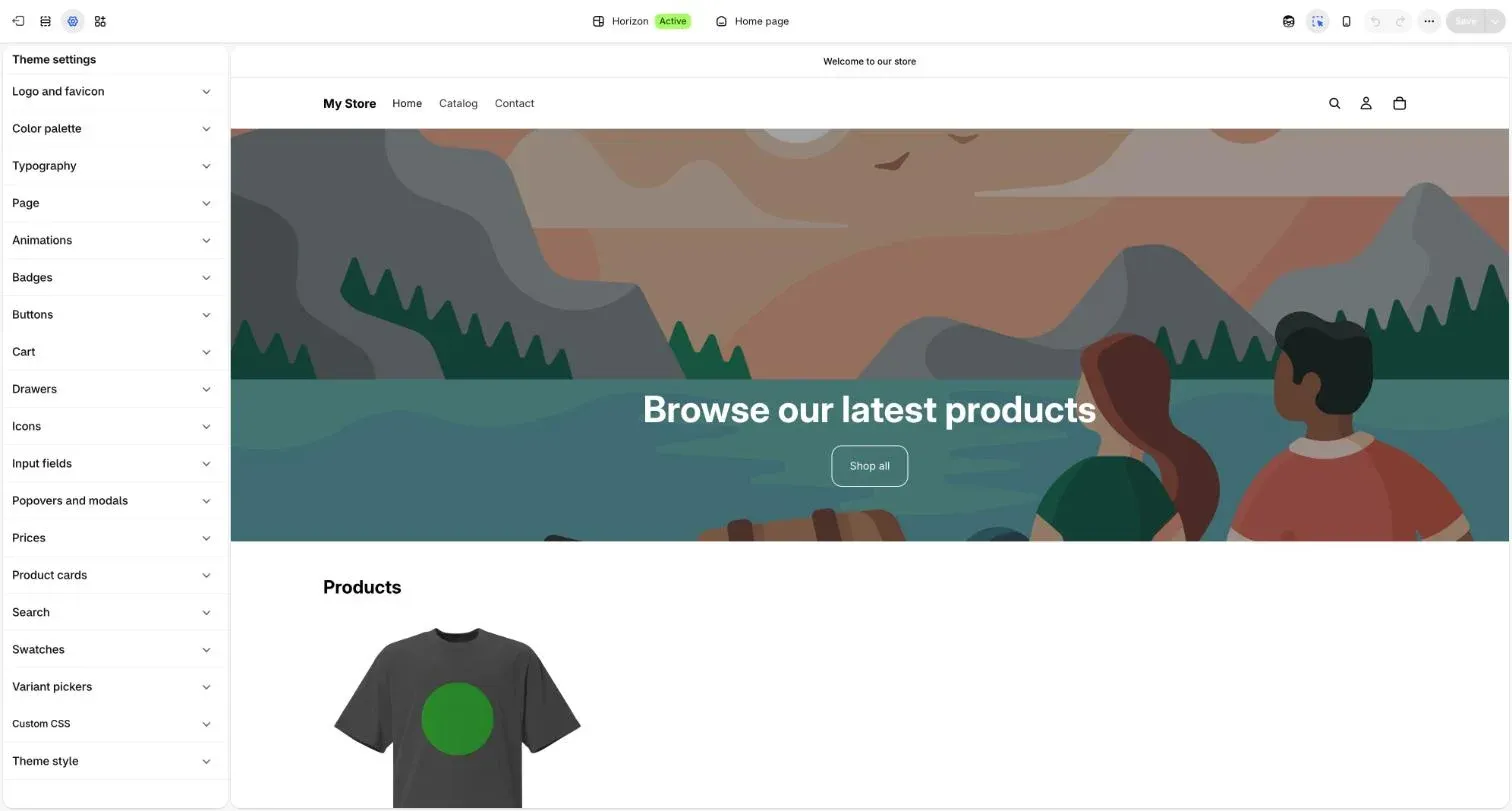
Shopify gives you more design control. It has a theme store with free and paid themes and full access to theme code. Sellfy has 11 pre-made themes that you customize without code. It's quicker to set up, but you can change less. Both let you use your own domain.
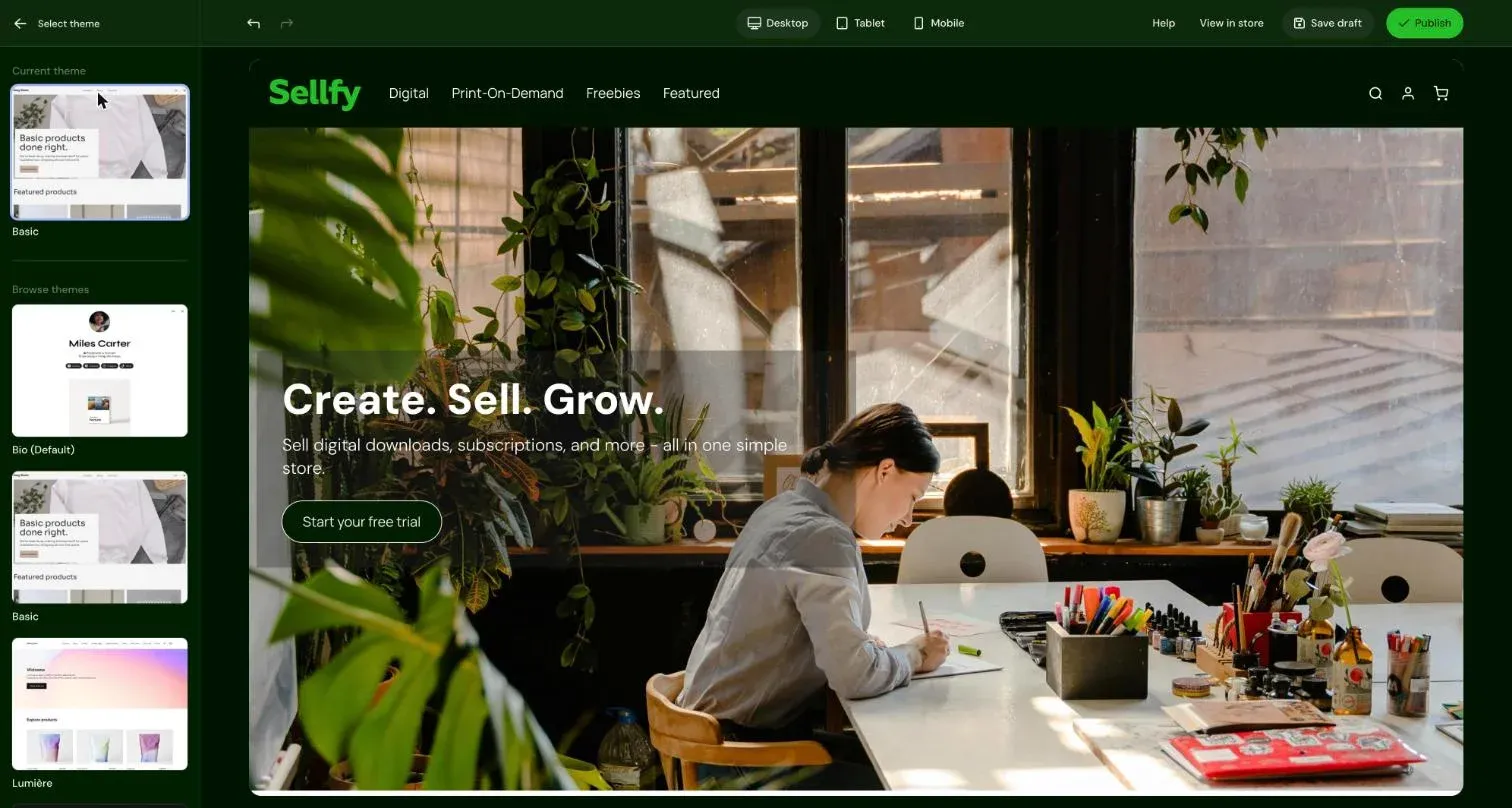
On Sellfy, Store style sets your store width, background, button colors, corners and fonts. You can also reorder or remove content blocks, or add your own HTML and CSS. Sellfy branding is removed from the Business plan up.
On Shopify, theme settings cover colors, typography, buttons, the cart and more, plus custom CSS. You can also work with a developer and build a store that looks unlike anyone else's.
Sellfy is the store builder behind 75K+ creators. One flat monthly fee, and no commissions on your sales.
When Shopify is the better choice
Shopify is the better choice if you sell physical stock, sell in person, or need a specific app or custom design. It's also cheaper once you pass about $16,000 a year in sales. And its cheapest plan includes cart recovery and 10,000 free emails a month.
Pick Shopify if:
- you sell mostly physical stock that you pack and ship yourself
- you sell in person as well as online
- your sales are well past $16,000 a year and plan fees matter more than setup time
- you want abandoned cart recovery and more free emails on the cheapest plan
- you need a specific app or a fully custom design
Which should you choose?
Choose Sellfy if you're a creator selling ebooks, templates, courses or merch to your followers. You'll set up with fewer steps and no apps. Choose Shopify if you run a physical-product business, sell in person, or want the biggest app store.
Zara (EfikZara) sells hair-care ebooks and planners on Sellfy. She used to sell on Shopify: "I used to have a Shopify store, but it's not as user-friendly as Sellfy." Read Zara's story.
Kyler Gregory sells American Truck Simulator skins as Southern Skinning. He compared platforms first: "I looked at other options like Shopify, but Sellfy felt more straightforward, especially for what I needed." His store made about $88,000 in 2025. Read Kyler's story.
Sellfy is the store builder behind 75K+ creators. One flat monthly fee, and no commissions on your sales.
FAQ: Sellfy vs Shopify
How good is Sellfy?
Sellfy is a good fit for creators who sell digital products, print-on-demand or subscriptions to their own audience. In my test, selling a PDF took 7 steps and a print-on-demand hoodie took 8, with no apps. It's less suited to large physical-product stores or sellers who need a big app store.
Is Sellfy legit?
Yes, Sellfy is legit. It has run since 2011, and 75,000+ creators have sold over $165 million with it. Payments go straight to your own Stripe or PayPal account, so Sellfy never holds your money. Paid plans have a 30-day money-back guarantee.
How much does Shopify take from a $100 sale?
On Shopify Basic with Shopify Payments, a $100 US online card sale costs $3.20 (2.9% + 30¢), so you keep $96.80. Shopify takes no extra cut. With a third-party card provider, Shopify adds 2% plus that provider's own fee. The same sale on Sellfy with Stripe also costs $3.20.
What digital products can you sell on Shopify?
You can sell ebooks, music, video, digital art and other files on Shopify once you add a digital delivery app. Shopify's free Digital Products app delivers files or links and can limit downloads. Shopify's standard product form has no file upload, so the app is required.
Does Sellfy have a free plan?
No, there is no Sellfy free plan. The Sellfy free trial lasts 14 days and needs no credit card. Paid plans start at $22 a month billed yearly and include a 30-day money-back guarantee. Sellfy takes no cut of your sales on any plan.
Does Sellfy bring buyers to my store?
No. Sellfy is a store, not a marketplace, so it doesn't send shoppers to you. Your buyers come from your own audience: social media, YouTube, your email list or your website. You bring the traffic, and Sellfy handles the checkout, delivery and payouts.
Does Sellfy accept PayPal?
Yes, Sellfy accepts PayPal and Stripe. Buyers can pay by PayPal or by card, Apple Pay or Google Pay through Stripe. Payouts go straight to your own PayPal or Stripe account, with no Sellfy holding period. Sellfy takes no cut of your sales.

Tips & Tricks
Tips for creators
Join thousands of creators receiving sales tips, marketing resources, and inspiring stories. No spam, pure value.