- tips & tricks
- |By Aleksey Haritonenko, Last Updated:
MCP for Ecommerce: A Guide for Creators
- MCP for ecommerce lets Claude or ChatGPT work inside your store. From a chat, you add products, create discount codes, check sales and draft emails.
- Sellfy's MCP server is included on every plan and the 14-day free trial. You sign in and click Allow, with no API keys or code.
- Kajabi, Stripe, PayPal, Square, Gumroad, Shopify, Wix and WooCommerce also have official MCP servers, but most are built for courses, payments or developers.
- With Sellfy, the AI can't email your buyers, publish on its own, delete products or move money.
Most store admin is small and repetitive, like adding a listing or making a discount code for your newsletter. MCP lets you hand that work to the AI app you already use for captions and planning.
What is MCP for ecommerce?
MCP for ecommerce means connecting an AI app like Claude or ChatGPT to your online store so it can do things there, not just talk about them. You ask in plain English, and the AI reads your products, orders and sales, or makes changes like adding a product or creating a discount code.
Sellfy is the store builder behind 75K+ creators. One flat monthly fee, and no commissions on your sales.
MCP stands for Model Context Protocol, an open standard Anthropic introduced in 2024. Claude, ChatGPT, Cursor, Perplexity and other AI apps now support it. Your store platform runs an MCP server, the connection point, and your AI app connects to it after you sign in and approve access.
That means your AI assistant can help right inside your store. For example, instead of copying a product description from ChatGPT and pasting it into your dashboard, you can ask it to add the description to the product for you.
Best MCP servers for ecommerce
The best MCP server for ecommerce depends on what you sell and how much setup you want. For creators selling digital and physical products, Sellfy's MCP server runs the whole store from a chat with one sign-in. Kajabi covers course businesses, payment platforms cover payments, and Shopify's, Wix's and WooCommerce's servers mostly serve developers.
Here are the ecommerce MCP servers worth knowing, and who each one suits.
| Platform | Official MCP | Best for | How you connect |
| Sellfy | Yes | Creators selling digital and physical products | Sign in to Sellfy and click Allow. Included on every plan |
| Gumroad | Yes | Gumroad sellers who want to check sales and draft products | Claude connector directory, or a custom connector URL |
| Kajabi | Yes | Course and coaching businesses | Sign in to Kajabi. Included on every plan |
| Stripe | Yes | Sellers running their own checkout on Stripe | Claude or ChatGPT directory, or an agent API key |
| PayPal | Yes | PayPal business tasks like invoices | PayPal login or API credentials |
| Square | Yes (beta) | Square sellers, online and in person | Sign in to Square |
| Shopify | Yes, for developers | Developers building AI shopping assistants and apps | Developer setup |
| Wix | Yes | Building and managing Wix sites with AI tools | Server URL added to your AI app's settings |
| WooCommerce | Developer preview | WordPress stores with a developer on hand | WordPress plugin plus technical setup |
Sellfy. Our MCP server covers products, orders, sales, discount codes, email campaign drafts, store pages and license keys, with nothing to install. See every action it supports on the Sellfy MCP server page.
Gumroad. Gumroad's MCP server works with Claude. It reads your products, sales, buyer emails and payouts, and new products start as unpublished drafts. Customers still pay through Gumroad checkout.
Kajabi. Kajabi's MCP works across pages, emails, offers, courses and contacts, and its changes land as drafts. It doesn't cover analytics, so it can't answer sales questions the way Sellfy's does. It's included on every Kajabi plan, which start at $143/mo billed annually.
Stripe. Stripe's MCP server gives AI apps access to the Stripe API: customers, payments, invoices, products and payment links. It can also create refunds after you approve them in the Stripe Dashboard.
PayPal. PayPal's MCP server lets you handle PayPal business tasks in plain language, such as creating and listing invoices.
Square. Square's MCP server is official and in beta. It connects AI apps to your Square customers, orders and items.
Shopify. Shopify's official servers, such as Storefront Catalog, Cart, Checkout and Customer Accounts, help developers build AI shopping assistants for Shopify stores.
Wix. The official Wix MCP server is built for creating and managing Wix sites with AI tools like Claude and Cursor.
WooCommerce. WooCommerce MCP is official but still in developer preview, so expect some technical setup.
Payhip and Etsy have no official MCP server that manages your store. Etsy's official Dev MCP server only answers questions about its API.
Sellfy is built for creators who want to run their whole store from a chat by signing in, with no API keys or plugins. To compare platforms beyond MCP, see our guide to the best ecommerce platforms for digital products.
MCP use cases: what you can do in an online store
The most useful MCP use cases for a store are the small weekly jobs: adding products, creating discount codes, checking sales, drafting emails and fixing weak listings. The MCP examples below build on the prompts from our MCP page, written for a real Sellfy store that uses MCP.
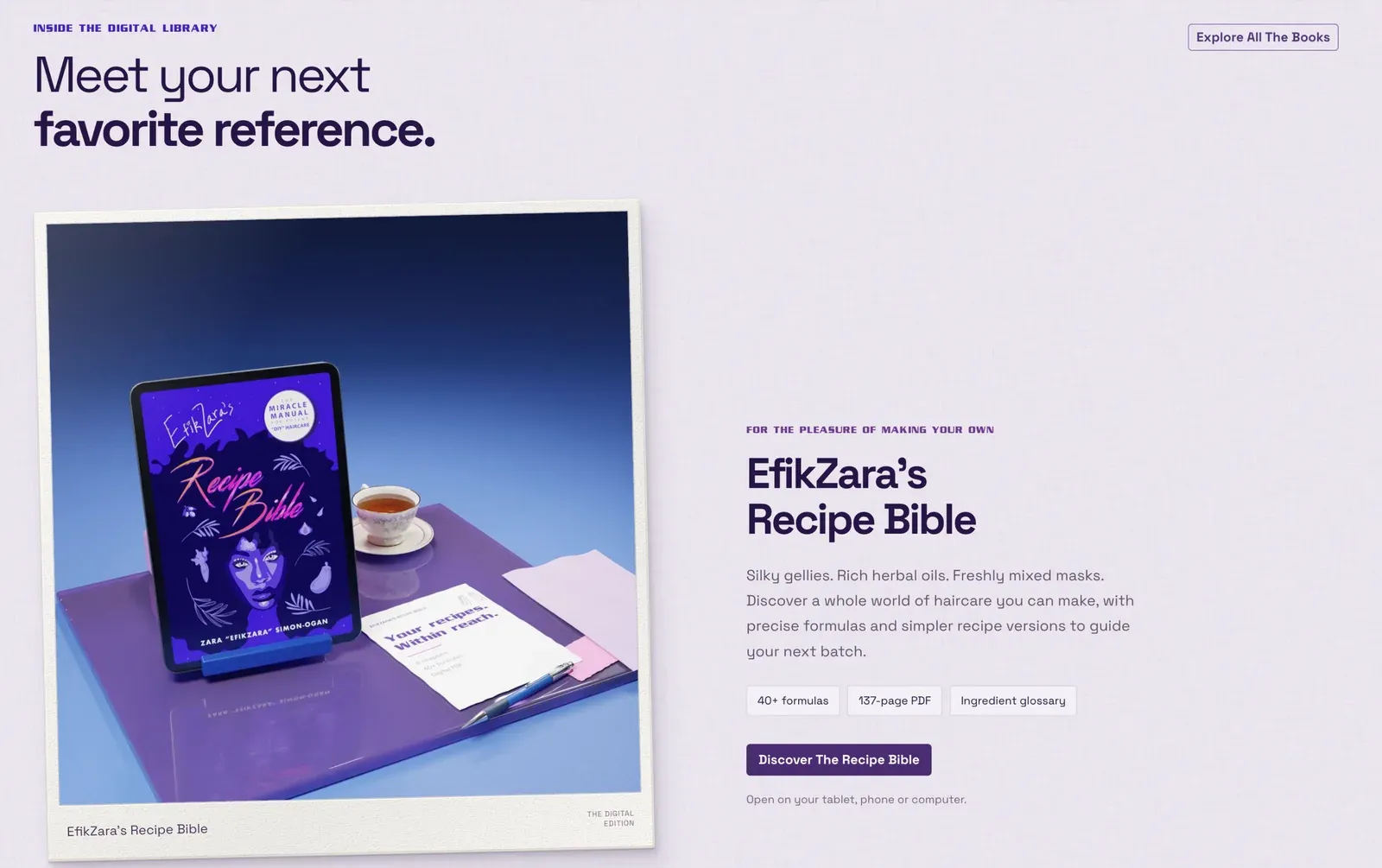
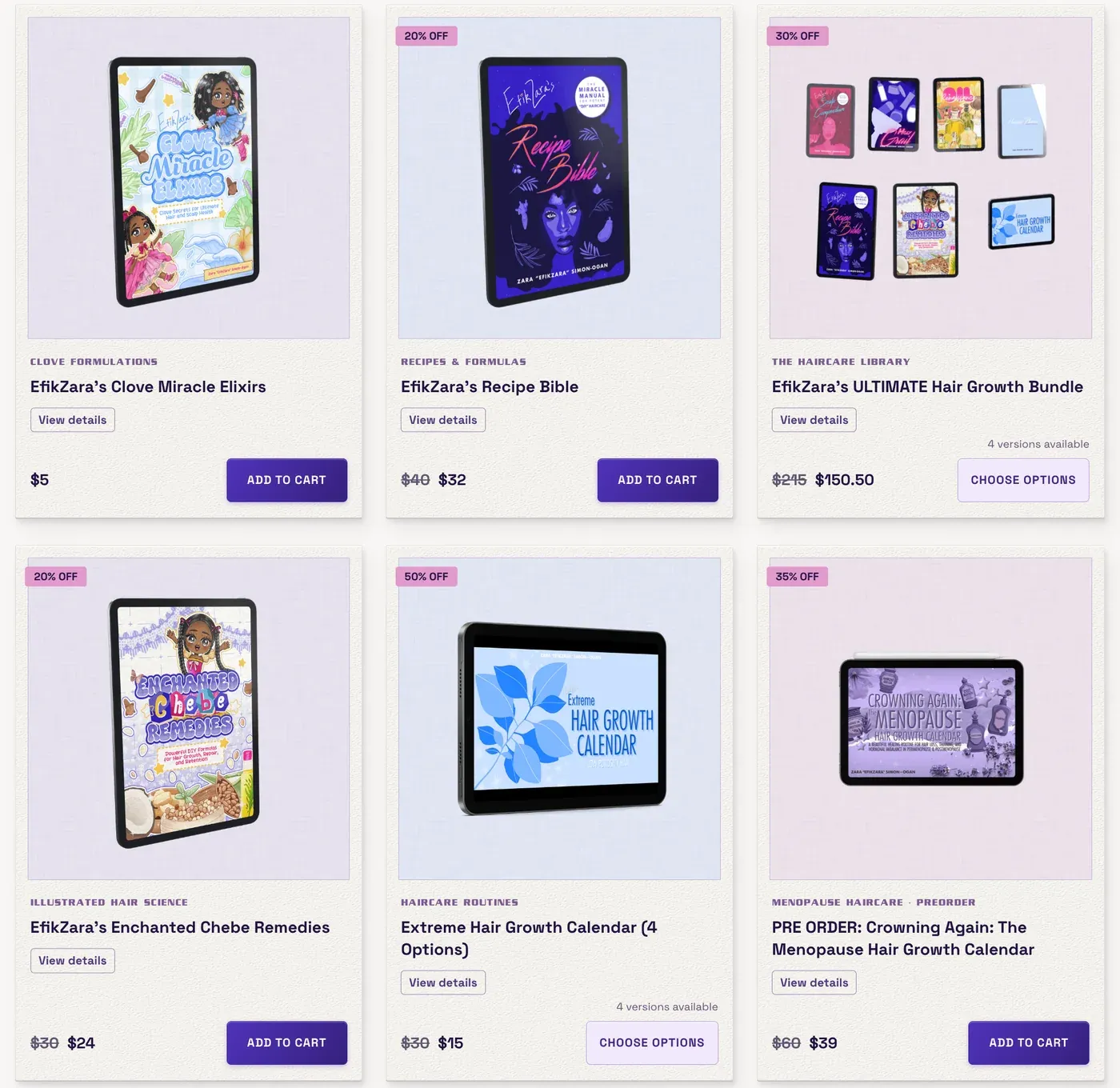
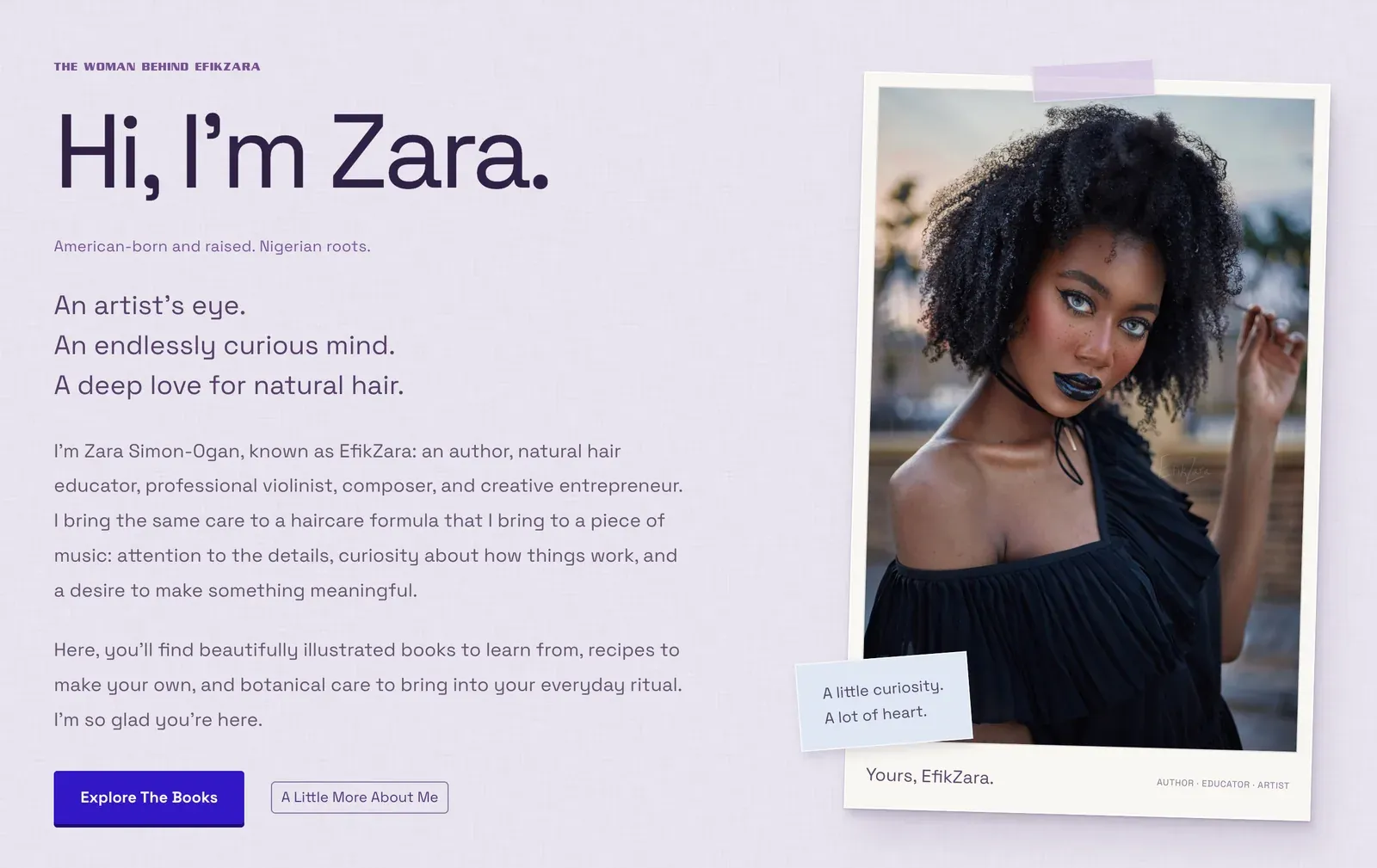
Take EfikZara, for example. Run by Zara Simon-Ogan, a natural hair educator, author, and professional violinist, the store turns her Instagram and YouTube audience into paying customers. Her Sellfy shop features everything from hair and skincare ebooks to planners, bundles, herbal hair oil, and apparel. Her Recipe Bible alone is listed as having sold over 1,000 copies.
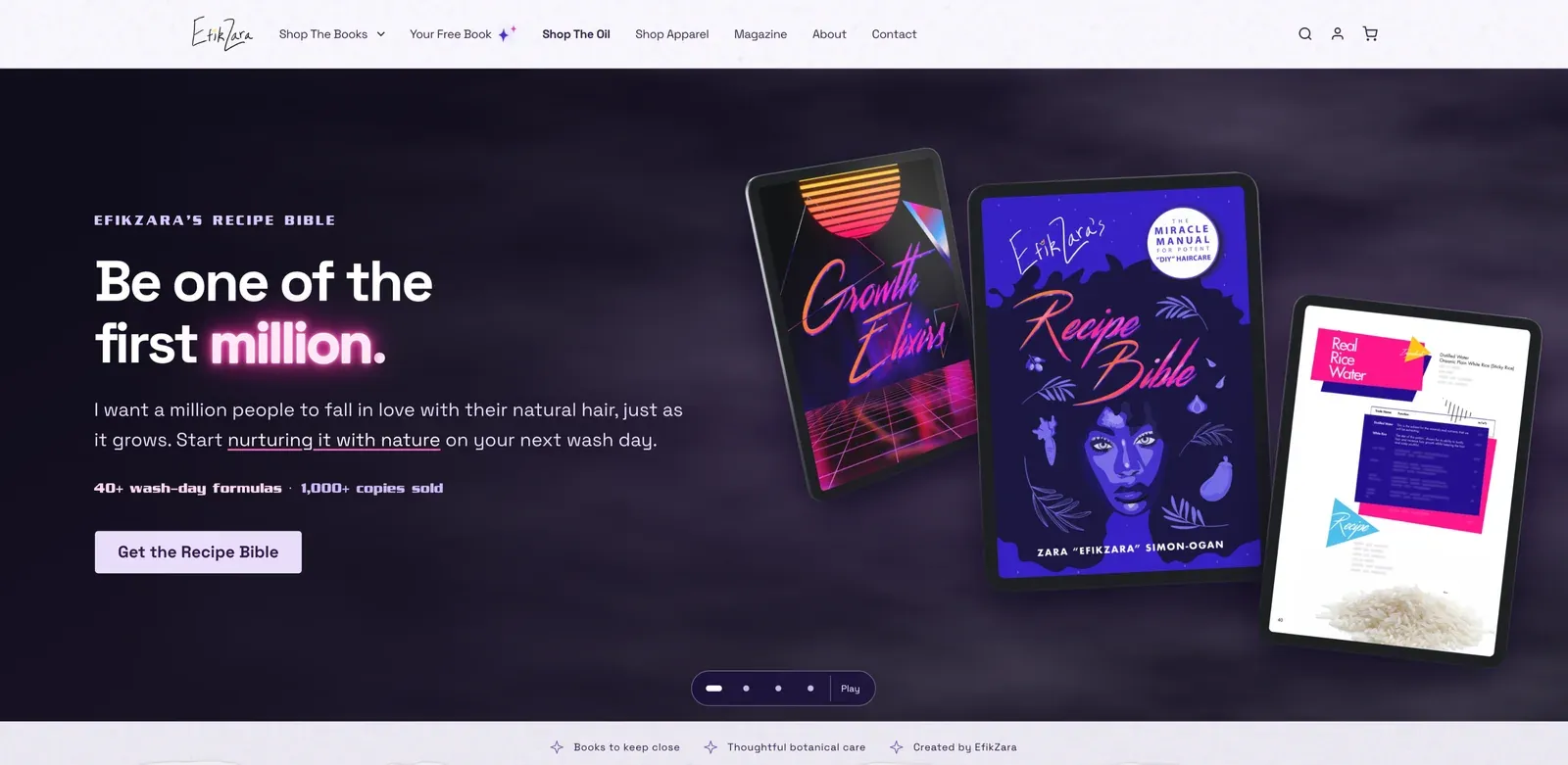
Zara moved to Sellfy from Shopify and now uses our MCP server. In her words: "Having that level of creative control without needing to personally write every line of code has been liberating." Each prompt below is written for her catalog.
Create and edit products
"Add a new hair care eBook at $24, attach the PDF, match the description to my other books and leave it unpublished."
You get a draft listing with the file attached and a description written in the voice of the other books. New products always start unpublished, so you check it before buyers see it. For product ideas and file prep, see how to create digital downloads.
Create discount codes
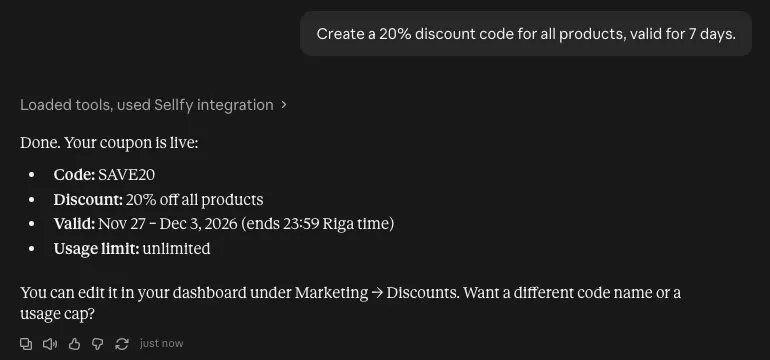
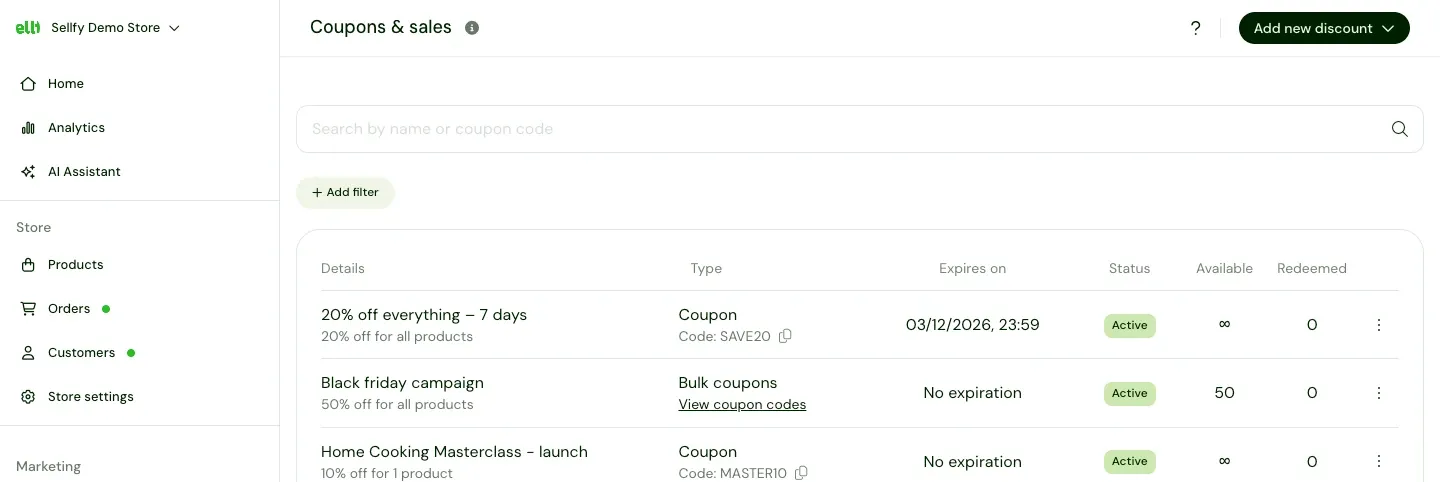
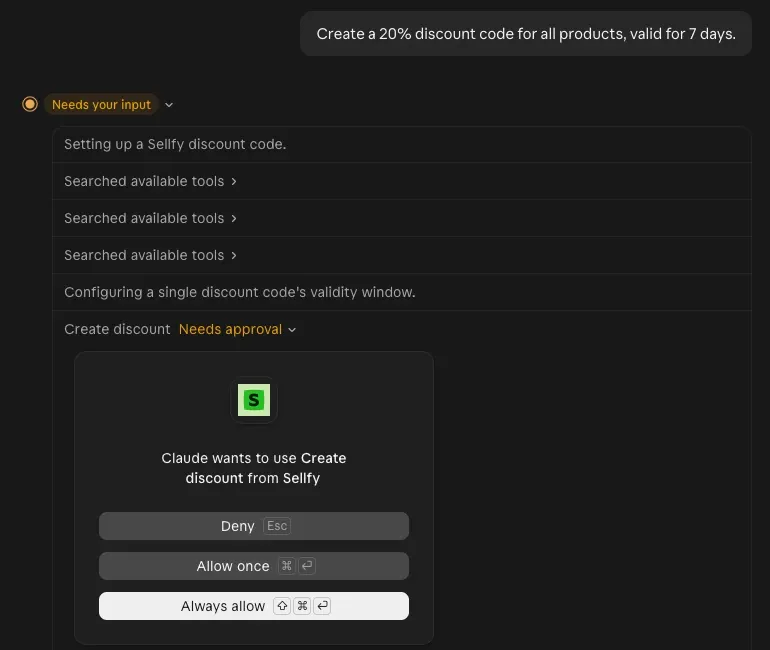
"Create a 20% discount code for all products, valid for 7 days."
The code is created and ends after 7 days. To end it early, ask the AI to expire it. Zara's library already shows sale prices from 15% to 50% off, so a short code like this would work as an extra offer for her email list or a Reel.
Check sales and your best product
"Compare last month to the month before and tell me which book made the most."
You get revenue, order count, the change between the two months and your top product, pulled from your real store data. With a dozen books, an oil and apparel, that would otherwise mean an export.
Draft email campaigns
"Draft a four-sentence email about the Crowning Again calendar pre-order and send me a test."
A campaign draft appears in your dashboard, and a test lands in your own inbox. You read it, adjust it and send it yourself. It's AI email marketing without another tool to learn.
Find thin listings and edit pages in a draft
"Which products have no image or a description under two sentences?"
You get a list of listings to fix. Ask it to rewrite them next, and it works like an AI product description generator that already sees your store. For what makes a description sell, read our guide to writing product descriptions.
"Rewrite my About page to match my Instagram captions, put it in a draft and send me a preview link."
You get a preview link to the new page. Your live store stays exactly as it was until the draft is published.
These MCP examples work the same in any Sellfy store, whatever you sell.
Sellfy is the store builder behind 75K+ creators. One flat monthly fee, and no commissions on your sales.
How to connect your store to Claude or ChatGPT
To connect your store, add its MCP server to your AI app, sign in to your store account and approve access. With Sellfy there's no code to write. Our MCP server is free on every plan, and most AI apps have a free tier.
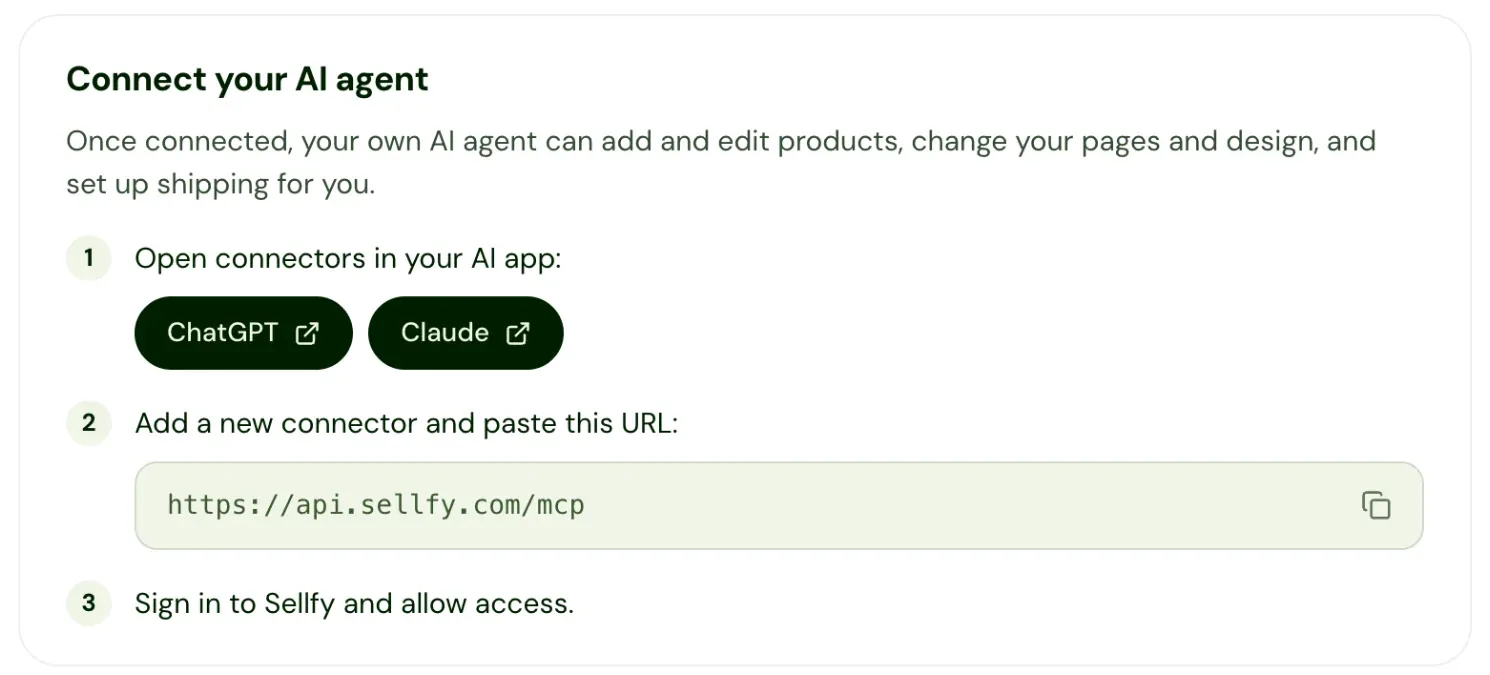
Set up the Claude connector
- Open the Sellfy listing in the Claude directory and click Connect to Claude.

Step 1: the Sellfy listing in the Claude directory.
2. Sign in to Sellfy, check the store name and click Allow.
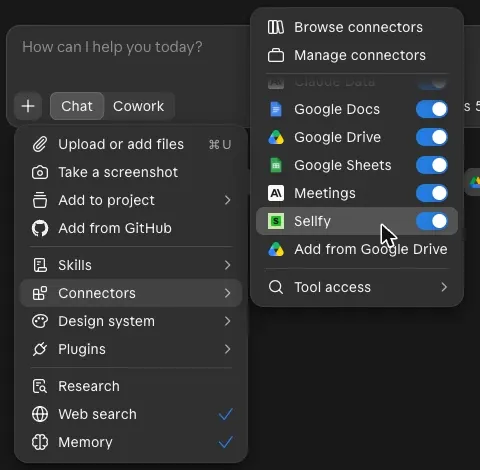
3. In a chat, click + at the bottom left, choose Connectors and switch Sellfy on.
Step 3 is the one people miss. Sellfy is switched on per conversation, so if Claude says it can't see your store, check the toggle first. Sellfy works on every Claude plan, including Free, and it's listed among the Claude connectors in the directory, so you don't need to paste a server URL.
Set up ChatGPT MCP
The quickest way is the Sellfy plugin for ChatGPT.
- Open the Sellfy plugin in ChatGPT and add it.
- Sign in to Sellfy, check the store name and click Allow.
- In each chat, type @ and pick Sellfy.
You can also add Sellfy by hand: go to chatgpt.com/plugins, click +, choose Add custom MCP server, name it Sellfy and paste https://api.sellfy.com/mcp. You don't need Developer Mode, whatever older guides say. ChatGPT now calls these connections plugins, and what you can add depends on your plan and workspace.
The same server URL works in Claude Code, Cursor, Perplexity, Lovable, Replit and Mistral Le Chat. Steps for each are in our help article and on the Sellfy MCP page.
MCP vs API vs Zapier: which do you need?
Use MCP when you want to ask an AI assistant about your store or ask it to do something there. Use Zapier to automate a task that should happen every time something specific occurs, like adding each completed sale to a spreadsheet. Use the API when you need a developer to build a custom integration. Sellfy supports all three, so you can start with the option that fits your needs and add others later.
| MCP | Zapier | API | |
| How it works | You ask in plain English, and the AI does it | A trigger starts a fixed action | Code talks to your store directly |
| Setup | Sign in and click Allow | Build a zap, no code | API key plus code |
| Example | "Create a launch code and draft the email" | Add every completed sale to a Google Sheet | Check license keys inside your own app |
If a task happens after every sale, set it up once in Zapier. If it comes up now and then, ask for it in a chat.
Is MCP safe? What the AI can and can't do in your store
MCP is safe for a store when the server limits the AI's permissions and you approve every connection. We built Sellfy's MCP server so the AI can't email your buyers, publish on its own, delete products or move money. The AI won't send campaigns or publish new products on its own.
- It can't email your buyers. Campaigns stay drafts, and test emails go only to your own address.
- It doesn't publish on its own. New products start unpublished, and page edits stay in a draft with a preview link.
- It can't delete products or discount codes. Discounts can be expired instead, so nothing disappears by accident.
- It can't issue refunds or move money. Payouts, Stripe and PayPal work exactly as before.
- It can't overwrite your recent changes. If you edited a page after the AI last read it, its change is rejected and it reads the page again.
- You stay in control. Disconnect from your AI app at any time. Changing your Sellfy password ends every connection at once.
Connected apps share 120 requests a minute, and a connection ends after 30 days without use or 180 days in total. To reconnect, sign in again.
To answer questions about orders, the AI app can see buyer names and email addresses. That data goes to the AI provider you connected and is handled under its terms, so use an AI account you'd trust with business information.
Sellfy is the store builder behind 75K+ creators. One flat monthly fee, and no commissions on your sales.
Mistakes to avoid
The most common MCP mistakes are small ones: forgetting to switch the connection on, skipping the preview and expecting the AI to do things it was built not to do. Watch for these four in your first week of using it.
- Forgetting to switch Sellfy on. In Claude, each new chat starts with the connection off until you turn it on.
- Skipping the preview. Open the preview link before a draft page goes live, the way you'd proofread a caption.
- Waiting for the AI to send your email. It drafts and sends you a test, and you send the campaign from your dashboard.
- Expecting the AI to bring buyers. MCP makes running your store faster. Sales still come from the audience you build on Instagram, YouTube or your email list.
How MCP fits with AI agents in ecommerce
AI agents in ecommerce work on two sides. On your side, MCP lets an AI agent run the store tasks you ask for. On the buyer's side, AI shopping assistants search, compare and buy products for people. This guide covers the first one, running your own store with AI.
FAQ
What is an MCP server?
An MCP server is the connection point that lets an AI app work with another service. Your store platform runs it, and your AI app connects to it after you sign in. For a store, your AI app can then read products and orders and make the changes you ask for.
Is there an MCP for Shopify?
Yes. Shopify has official MCP servers, including Storefront Catalog, Cart, Checkout and Customer Accounts. They're built for developers creating AI shopping assistants and apps. Creators who want to run their own store from a chat, without developer setup, can use Sellfy's MCP server. Last checked November 27, 2026.
Do I need a developer to use MCP?
No. You don't need to set up an MCP server yourself, because Sellfy runs it. You add the server to your AI app, sign in to your store and click Allow. There are no API keys, no code and nothing to install. Some platforms, like WooCommerce, need more technical setup before you can use them.
Is MCP free?
Sellfy's MCP server is free on every plan and during the 14-day free trial, with no add-on or usage fee. Plans start at $22 a month billed annually. You also need an AI app that supports MCP, and most have a free tier.
Which AI tool is best for ecommerce?
The best AI tool for ecommerce is one that can act in your store, not just answer questions. That means an AI app that supports MCP, such as Claude or ChatGPT, connected to your store's MCP server. Start with the one you already use every day.
Connect your store once, then paste the discount prompt above into a new chat. The code shows up in your Sellfy dashboard right after.
Sellfy is the store builder behind 75K+ creators. One flat monthly fee, and no commissions on your sales.

Tips & Tricks


Tips for creators
Join thousands of creators receiving sales tips, marketing resources, and inspiring stories. No spam, pure value.