- tips & tricks
- |By Aleksey Haritonenko, Last Updated:
How to Sell PDFs Online: Best Platforms + 6 Steps
- Sell your PDF through a storefront that handles checkout and delivery for you — manually emailing files works for the first few sales, then breaks.
- Price by the result it gets the buyer, not the page count. Most PDFs sell for $5–$49.
- Send traffic from an audience you already have. That drives more first sales than the file itself.
- The file is the easy part. Picking a setup that doesn't take a cut of every sale, and picking a topic people already pay for, is what decides whether it sells.
Most people overcomplicate this. I found the hard part is never making the file — it's choosing a PDF people already want and packaging it clearly.
And there's real money in it. Across Sellfy stores last year, e-books took 10% of all sales and online courses, tutorials, and guides took another 10%. That's a fifth of everything sold, nearly all of it delivered as a PDF. On top of that, creators moved roughly 32,000 printable products — planners, worksheets, trackers, checklists. You can see the full category breakdown here.
This guide walks the practical path from idea to first sale: where to sell, what to charge, how to protect the file, and how to market it without turning this into a full-time content machine.
We'll talk about:
- Where to sell PDFs, and what each route actually costs
- How to create a PDF that people want to buy
- How to price and protect it
- Marketing that works when you don't have a big audience
- What actually sells as a PDF, and how to pick your format
Let's dive right in.
Where to sell PDFs online
This is where most creators lose momentum — trying to stitch together five tools before getting one product live. You have three realistic routes, and the difference between them comes down to two things: what each sale costs you, and who is expected to bring the buyer.
| Route | What it costs | Who brings the buyers | Best for |
| Your own store (e.g. Sellfy) | Flat monthly fee from $22, 0% per sale | You do | Anyone planning to sell more than one PDF |
| A marketplace (Etsy, Teachers Pay Teachers) | ~6.5% per sale plus listing and processing fees | The marketplace — but you compete with everyone on the same page | Testing whether an idea sells at all |
| Your existing website | Depends on the checkout you embed | Your existing visitors | Blogs and portfolios that already get traffic |
Here's the fee math nobody does up front. At $10,000 a year in sales, a 10% platform cut is $1,000. Sellfy's Starter plan covers that same $10,000 for $264 billed annually, with no cut per sale. Percentage pricing is cheaper while you're testing and more expensive the moment it starts working — which is exactly backwards from what you want.
Your own store
A store gives your PDFs a permanent home under your brand instead of a listing that sits next to twelve competing products. If you plan to sell more than one thing over time, that control over branding, pricing, and the customer relationship is the whole argument.
It also gives you room to grow: shape the product page around one clear outcome, test pricing freely, bundle related PDFs, and turn one-off buyers into repeat customers.
For the walkthrough below I'll use Sellfy, since it's built specifically for digital products and covers the full workflow — payments, automatic delivery, customer and order management, and sales tracking. Most of these steps apply to other store tools too.
What you get without setting anything up:
- Store live the same day, no plugins;
- Digital file delivery built in;
- Stripe and PayPal support;
- PDF protection tools (stamping, download limits, unique links);
- Custom domain on paid plans;
- Upsells and email tools when you're ready for them.
Here's how to sell PDFs with Sellfy:
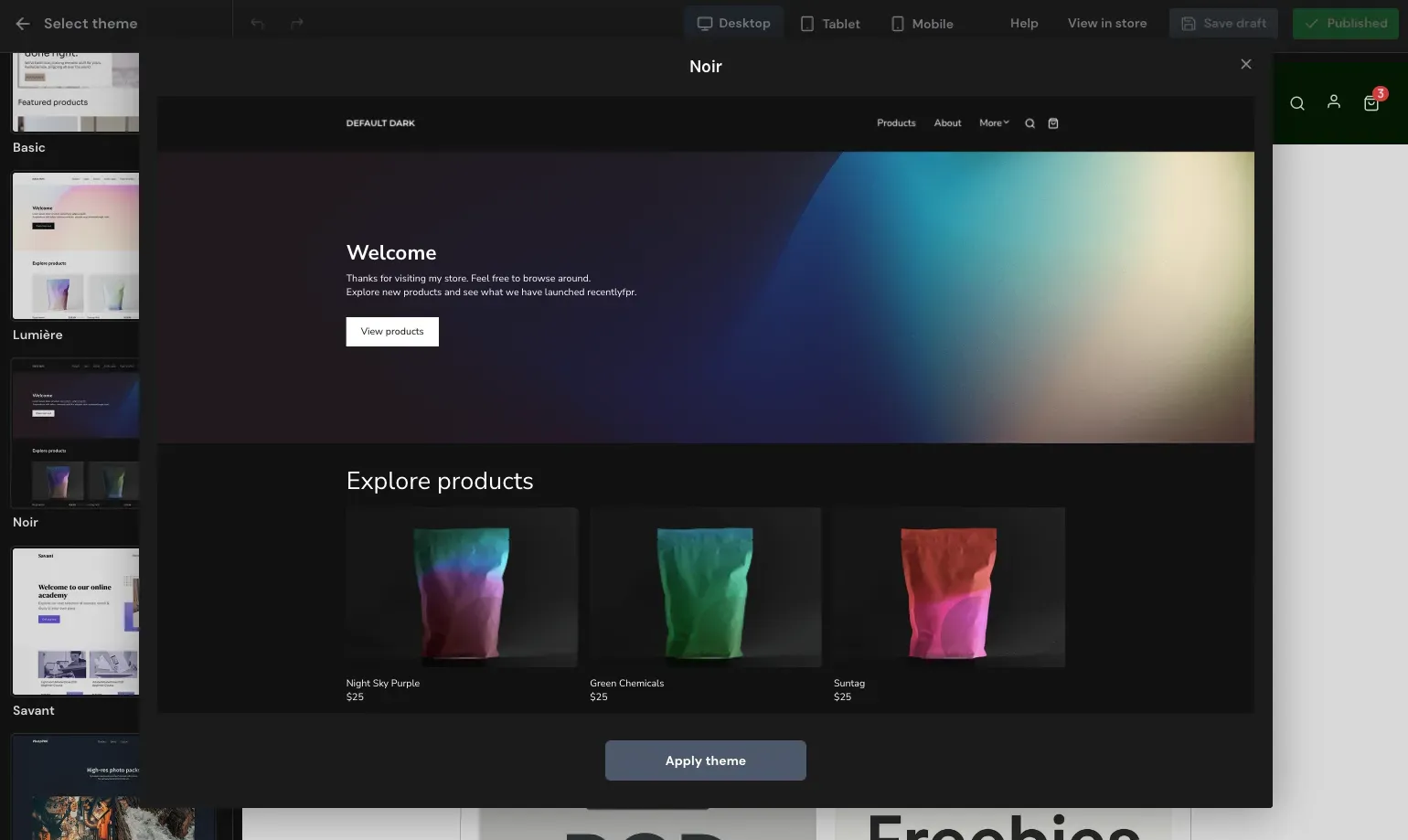
1. Set up and customize your store. Use the Store Customizer or one of Sellfy's pre-made themes. Add your logo, colors, and copy so it reads as your brand rather than a generic checkout.
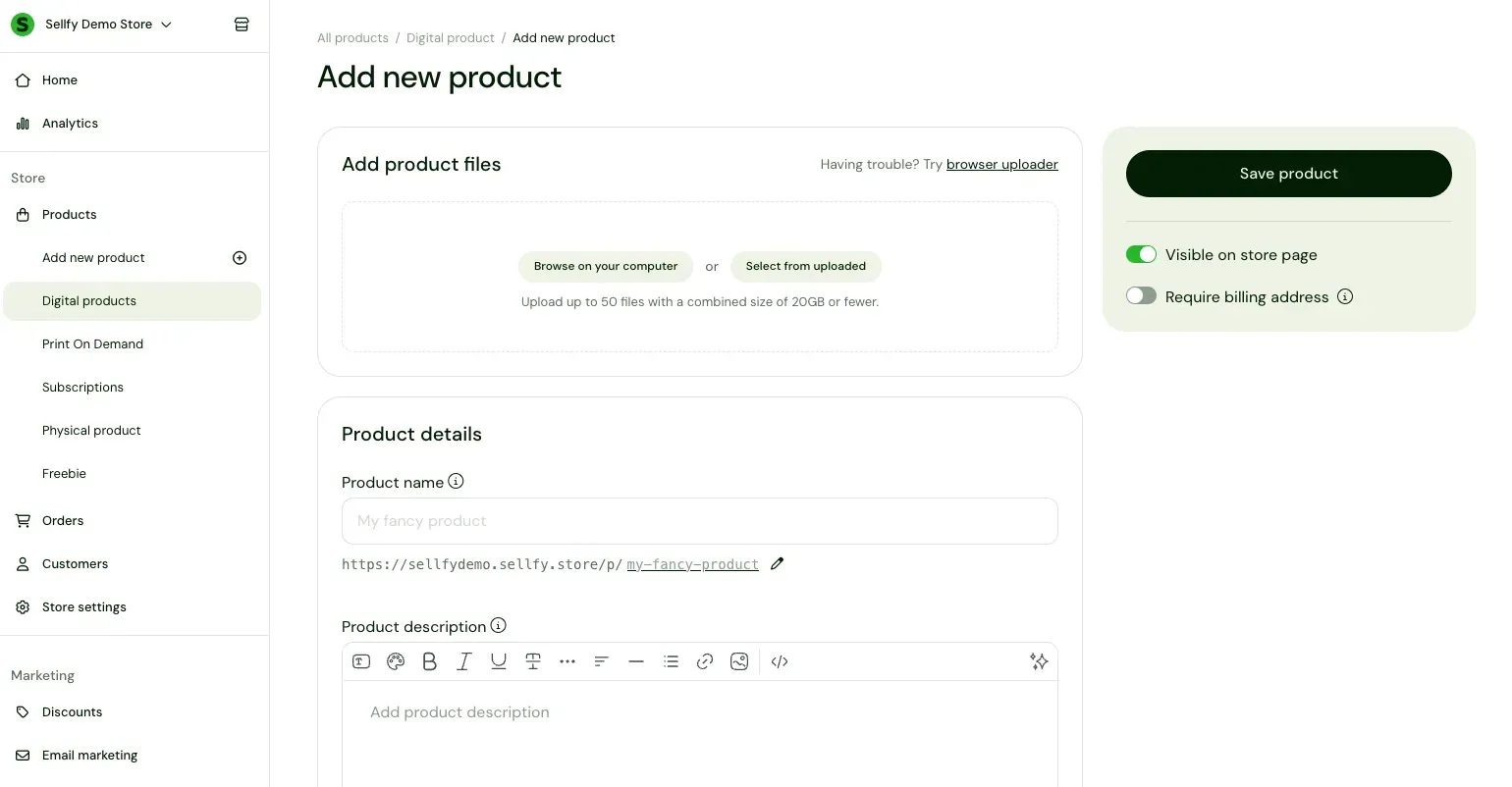
2. Upload your products. You can attach up to 50 PDF files to a single product, so you don't have to upload one by one. If you'd rather deliver everything as one file, create a compressed .zip or .rar folder. There are also plenty of ways to compress your PDFs without losing quality.
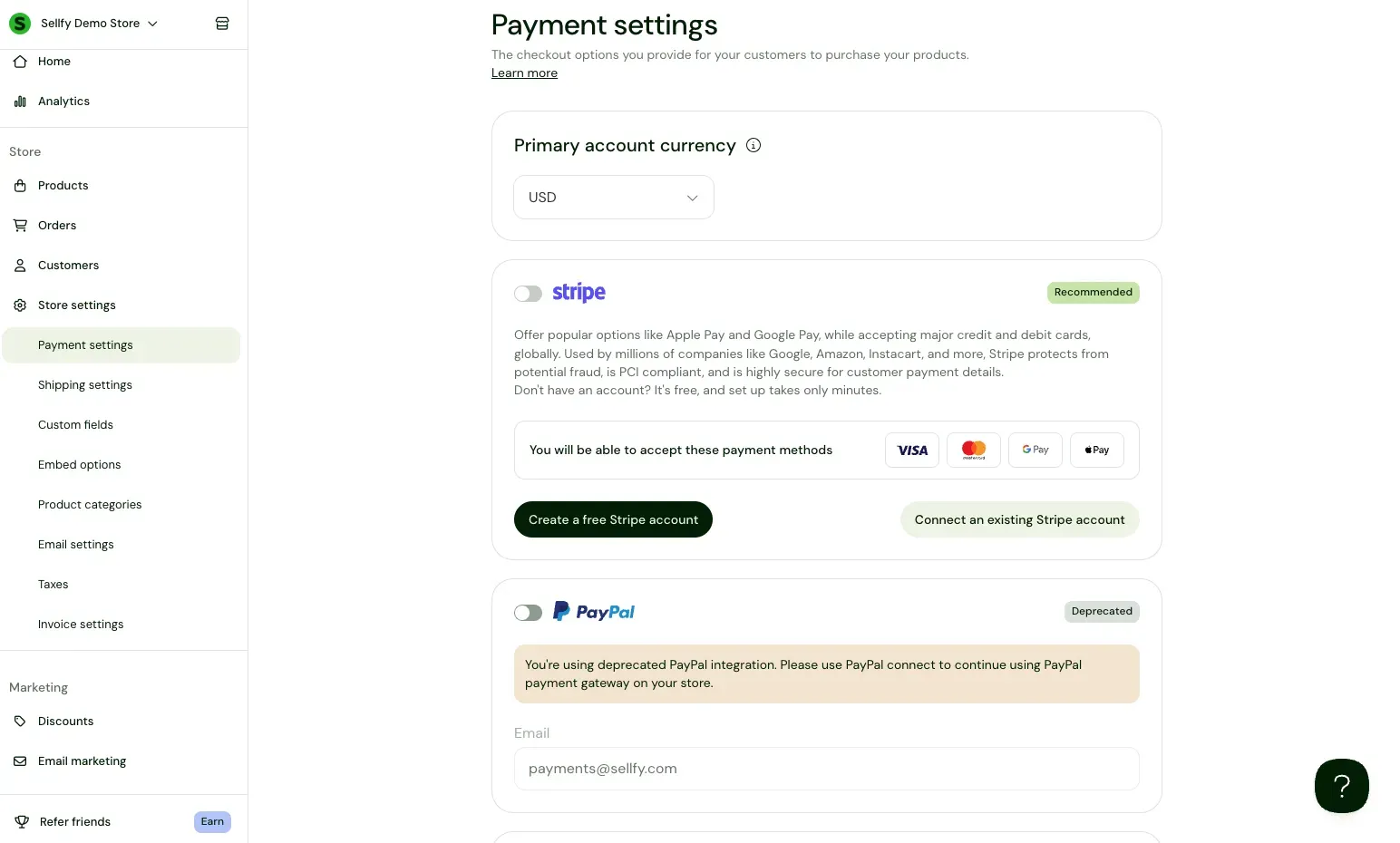
3. Set up payment methods. Connect your processors before you go live. Sellfy integrates with PayPal and Stripe, which cover most buyers worldwide.
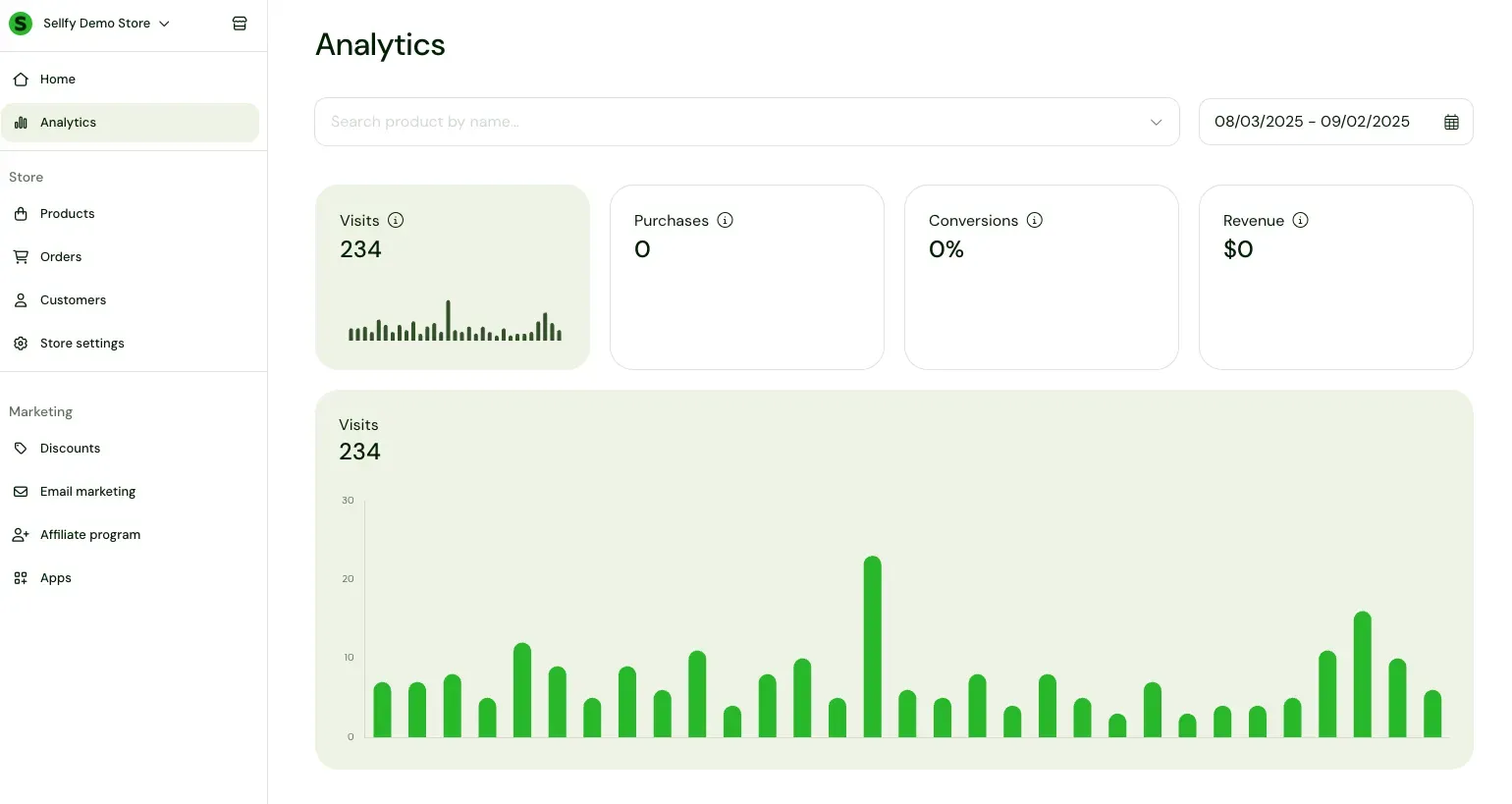
4. Track your sales. Use Sellfy Analytics and the mobile app to watch store performance and get order notifications in real time.
A marketplace
Marketplaces give you a discovery layer. Etsy alone has 450 million visitors a month, which can help you validate demand before you build anything of your own.
The trade-off is what it costs and what you give up. Etsy typically charges around 6.5% transaction fees plus payment processing and listing fees, while platforms like Gumroad may take around 10% per sale, or up to 30% when the sale comes from marketplace discovery. You also don't own the customer — the buyer is the marketplace's, not yours, so you can't email them about your next product. If those cuts feel steep for a simple PDF, it's worth comparing the best Etsy alternatives, the best Gumroad alternatives, or how Gumroad and Payhip stack up before you commit.
Places people use for PDF-style products:
- Etsy (printables, planners, templates, worksheets);
- Teachers Pay Teachers (lesson materials and classroom resources);
- Creative Market (design templates, guides, creative assets);
- Amazon KDP (more eBook-oriented, but relevant if you adapt your PDF).
I treat marketplaces as a test channel, not the business. Publish fast, find out whether anyone will pay, then move the product somewhere you keep the margin and the customer list.
Your existing website
Good option if you already have traffic from a blog, portfolio, or content site. Instead of rebuilding your setup, add the product to pages you already use. Sellfy does this with a Buy Now button, a single product embed, or a full storefront embed — here's the walkthrough on how to add a shopping cart to your website.
You keep your current design and start faster. Put the PDF where interest already exists — a blog post, resources page, or case study — and let the checkout, payments, and file delivery run themselves.
Sellfy is the store builder behind 75K+ creators. One flat monthly fee, and no commissions on your sales.
Step 1: Choose a PDF topic people actually want to buy
This is the step that decides whether your PDF sells or sits there. I always start with a problem. People do not buy "a PDF." They buy a faster move, a clearer plan, better grades, fewer mistakes, or a saved hour.
Here's the framework I use:
1. Start with a clearly defined buyer. A product gets easier to position when it speaks to one group with one type of need: students, freelancers, expats, creators, parents.
Broad audiences create vague offers. Specific audiences create sharper messaging and faster trust. Amel Aitouche's eBook titled "A practical guide to successfully settling in Dubai" works for that reason. It is not "advice for everyone moving abroad." It addresses a specific audience with a concrete problem.
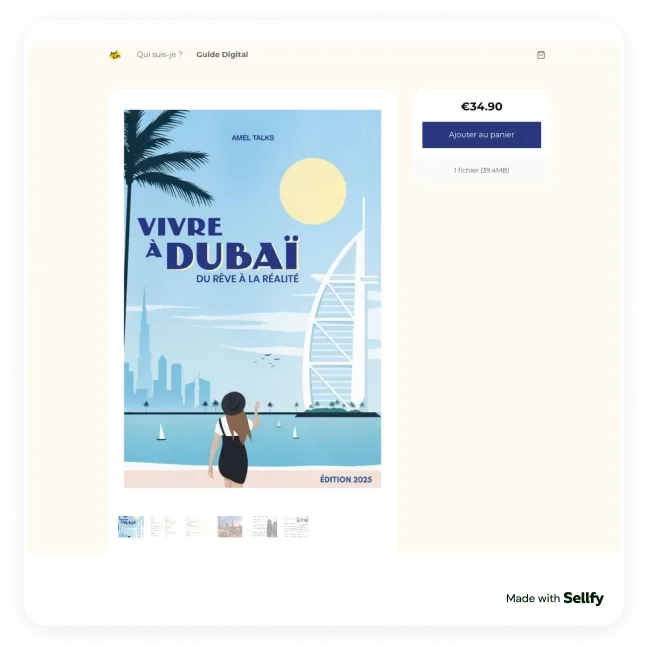
2. Focus on a problem people deal with more than once. The strongest PDF ideas address a recurring friction. Repeated problems create repeated demand, because the buyer already knows the task is annoying, time-consuming, or easy to get wrong.
3. Turn that problem into one usable outcome. The format matters less than the result. It can be a guide, a checklist, a template, or a workbook, but the buyer should immediately understand why it will be useful. Melissa Maribel's chemistry notes and study guides prove the point — they sell because they reduce study friction and make review more efficient.
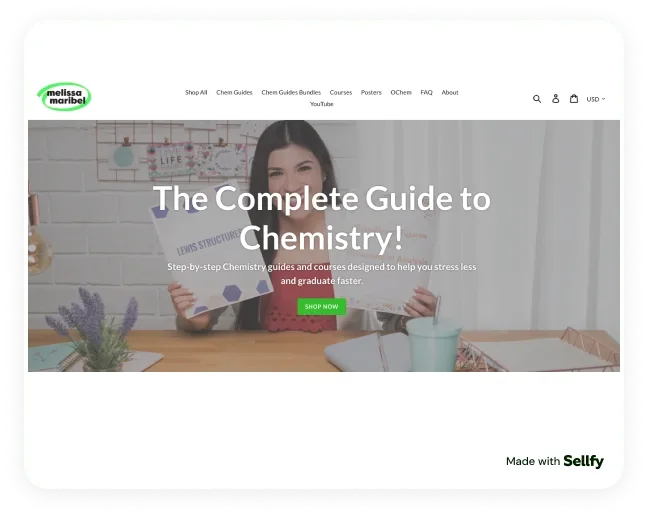
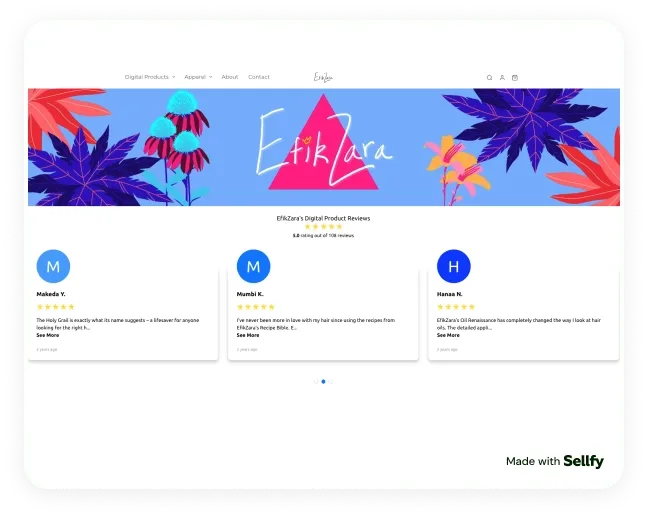
4. Make the value obvious in the title. A strong product title tells the buyer what they'll get or achieve. That works better than clever naming, because people scan fast and decide fast. Zara Simon-Ogan's titles illustrate the principle — names like "Haircare Planner" and "Path to Skin Healing" signal a direct outcome, so the product is easier to understand and easier to trust.
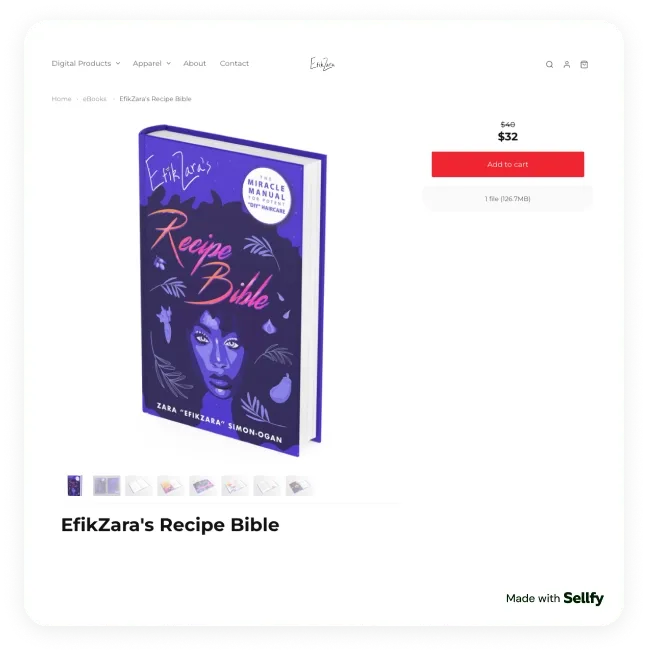
If you're stuck on what to make, don't overthink it — look at what's already selling. It's almost always the same play: someone notices a problem that keeps coming up, packages a clear solution, and ships it as a simple digital product people can use immediately.
How do you validate a topic before writing? I test demand with lightweight signals first:
- Repeated questions in comments, DMs, or email;
- Search phrases people use (not your internal wording);
- Content posts that get saves, not just likes;
- Requests for "a template," "a checklist," or "a full guide";
- Proof that people already pay for similar help.
If you already teach, consult, freelance, or explain things online, your PDF idea is probably hiding in the questions you answer every week.
Step 2: Create the PDF
The fastest way to create a PDF worth selling is to use a tool you already know, write for a clear outcome, and keep the layout easy to read. Build the content first, format it, export it, and test the real file on desktop and mobile.
You do not need expensive software. A clean, useful file beats a beautiful file that's hard to follow.
Outline before you design anything
I always outline the PDF first. This saves time and keeps the product focused. It also makes the offer easier to explain on the sales page, which matters just as much as the file.
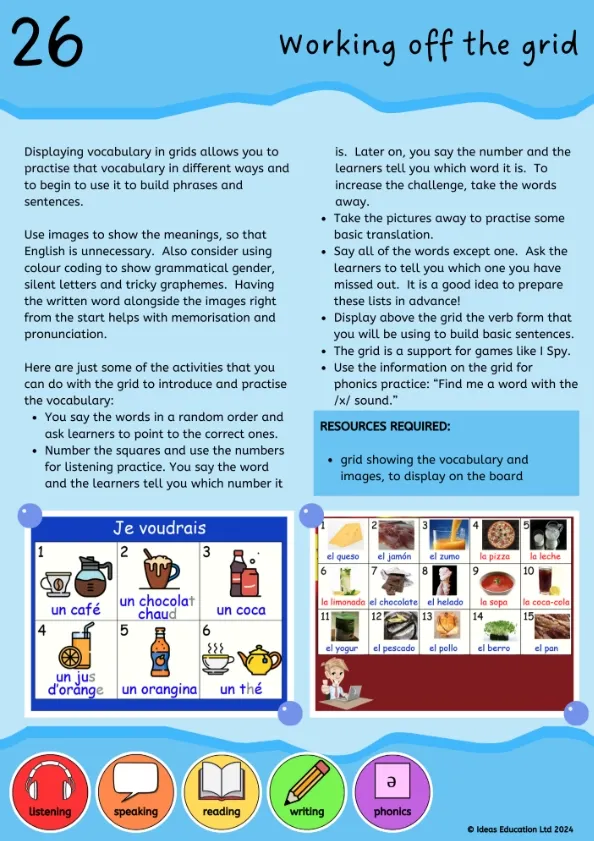
Ideas Education is a good example. Their downloadable language lesson packs work because the structure is obvious from the start: one audience, one clear use case, one practical classroom outcome.
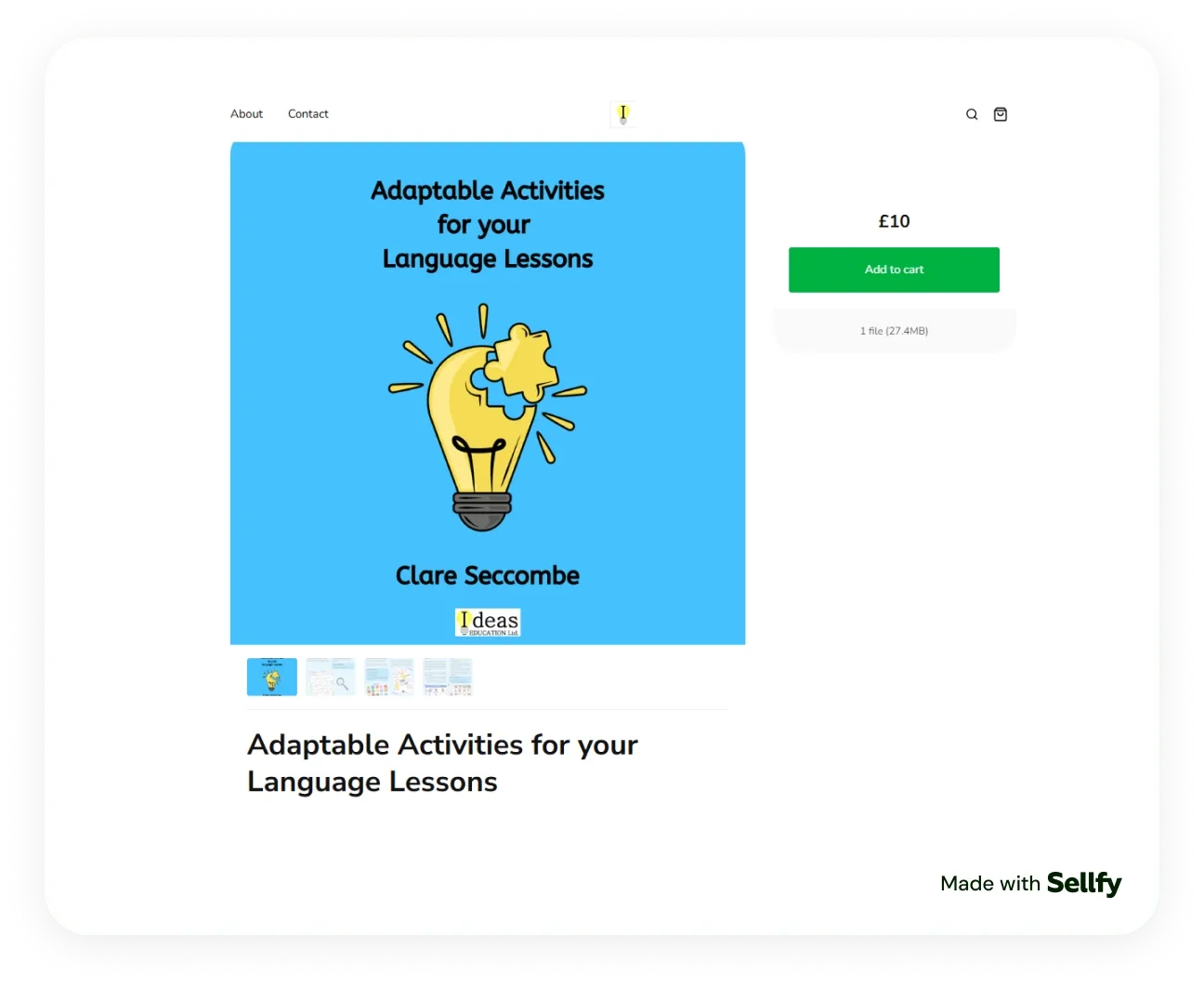
Build your outline around these points:
- Who this is for;
- What result they get;
- What's included;
- Step-by-step instructions;
- Quick wins or examples;
- FAQ/troubleshooting;
- Next steps.
This works for almost any PDF format — guides, checklists, workbooks, templates, and mini eBooks.
Pick a tool you can move fast in
Pick the tool that helps you finish. You can build a strong PDF in:
- Adobe Acrobat (especially for editing, cleanup, and export workflows)
If your workflow is simple, Google Docs or Word is enough. If the PDF needs a stronger visual layout, Canva is faster.
Format for readability
Most problems with selling PDFs start with clarity, not design quality. Keep formatting simple so people can scan the file and use it right away:
- Short paragraphs;
- Clear headings and subheadings;
- Enough white space between sections;
- Easy-to-read font size;
- Consistent spacing and alignment;
- Clear bullets and numbered steps;
- Mobile-friendly layout where possible.
If the buyer has to "figure out" how to use your PDF, the product needs a rewrite.
Keep in mind that PDFs aren't reflowable — layouts are fixed and won't adapt to screen size, which can make them harder to read on a phone. Any interactive element can also affect how the file renders.
Add examples and templates where you can
A PDF becomes more valuable when it helps people act. Depending on the product, include:
- A worked example;
- A filled-in sample page;
- A checklist version;
- A blank template version;
- A quick-start page for people in a hurry.
This is what makes a PDF feel practical. It also cuts down support questions after purchase.
Export and test the final file
Before you upload, export the file and test the real buyer experience:
- Open the PDF on desktop.
- Open it on your phone.
- Check links.
- Check page breaks.
- Check formatting consistency.
- Check spelling and grammar.
- Confirm the file name looks clean and professional.
If people are likely to print it, do a print test too. This matters for worksheets, planners, checklists, and classroom resources.
Keep version control from day one
Even a small PDF will get updates. Save versions clearly so you don't lose track:
- product-name-v1;
- product-name-v1.1;
- product-name-print-version;
- product-name-editable-version (if relevant).
This makes future updates easier and stops you sending the wrong file to customers.
Sellfy is the store builder behind 75K+ creators. One flat monthly fee, and no commissions on your sales.
Step 3: Set up your store and delivery
Once the file is ready, the setup is short. Upload the PDF, write the product page, connect a payment processor, and turn on automatic delivery so buyers get the file the moment they pay.
The product page does more work than people expect. One clear outcome at the top, what's included, who it's for, a preview or sample page, and a price. That's it. A long sales page for a $19 checklist reads as overselling.
Two things worth getting right on day one:
- Automatic delivery. Manually emailing files works for the first three sales and breaks on the fourth. It also means you can't sell while you sleep, which is most of the point.
- A real product URL. A link you can put in a bio, an email, or a blog post, and that still works in six months.
If you went the marketplace route, most of this is handled for you — that's the upside. If you're on your own site, an embed handles checkout and delivery without a rebuild.
Step 4: Price your PDF
Pricing matters more than most creators think. I often see creators underprice because they focus on file size instead of value. Buyers do not pay for "30 pages." They pay for the result those 30 pages help them reach. To go deeper, a strategic pricing model for digital downloads should account for value, competition, and perceived quality rather than length.
My practical rules:
- Price by outcome and content value, not page count;
- Check competitor ranges, then position intentionally;
- Start with one price, then test;
- Build a ladder later (mini version, full guide, bundle);
- Use discounts strategically, not constantly.
Pricing patterns that work:
- Low-ticket ($5–$19): checklist, mini-guide, cheat sheet, worksheet pack.
- Mid-ticket ($19–$49): full guide, workbook, niche playbook, templates bundle.
- Higher-ticket bundle ($49+): systems, frameworks, niche libraries, business packs.
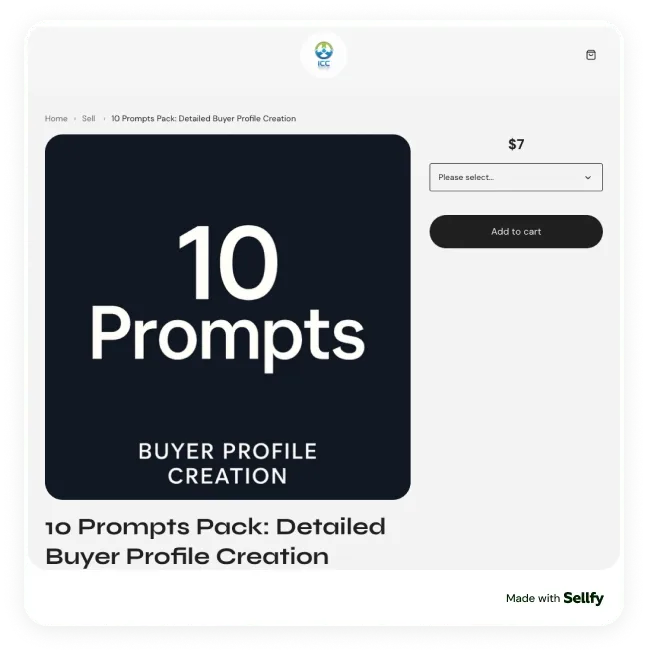
Match the price to the scope of the result. A focused product works well as a low-ticket entry offer — ICC Digitale Store sells its "10 Prompts Pack: Detailed Buyer Profile Creation" for $7, delivered as a PDF and built around one narrow outcome: creating a detailed customer profile faster.
A broader product supports a higher price. Amel Aitouche's Dubai relocation guide is far more comprehensive — her store lists it as a 125-page file currently priced at €29.90.
That difference is the real logic behind PDF pricing. Buyers pay for how much work the product saves, how much uncertainty it removes, and how complete the solution feels.
Step 5: Protect the file
You cannot fully stop piracy, but you can make casual sharing much harder. That's the goal. Practical protection discourages re-sharing, protects paying customers, and keeps the buying experience smooth.
PDFs are easy to copy, resend, and upload elsewhere, so your setup matters more than most creators expect. A good protection workflow doesn't need to be aggressive — it should reduce abuse without creating friction for honest buyers.
What I'd actually do:
- Use PDF stamping or watermarking. Add buyer-identifying details to the file so shared copies trace back to the original purchase.
- Limit download attempts. Set a reasonable limit so one purchase link doesn't become unlimited access.
- Use unique purchase download links. Give each buyer a unique delivery link instead of one static file URL.
- Block or restrict downloads when needed. If you see suspicious behavior, restrict access manually.
- Deliver through a secure platform. Use a controlled checkout and delivery flow instead of emailing raw files.
- Use file and checkout security features. PDF stamping, password protection, restricted downloads, encrypted delivery, secure checkout.
- Keep a clean support policy. Help legitimate buyers quickly if they lose access, use the wrong email, or hit a download limit. Protection should not feel like punishment.
No setup makes a PDF impossible to share, but the right safeguards reduce casual piracy. Sellfy includes PDF stamping, download limits, unique download links, and buyer access logs as standard, which covers most of the list above without extra tools.
Step 6: Market your PDF
This is where your PDF becomes a business instead of a file. The marketing that works usually looks simple from the outside: consistent content, clear positioning, real proof, and a direct path to buy.
Strong Sellfy creators rarely rely on clever tricks. They match content to product tightly, then repeat the same problem-solution message in different formats until buyers are ready.
Promote where your audience already is
Don't promote everywhere at once. Pick one channel that fits the product and use it consistently for a few weeks.
- Pinterest works well for planners, printables, and educational PDFs.
- Blog content and search traffic fit guides, checklists, and business resources.
- If people already follow you on Instagram, TikTok, or email, start there rather than spreading thin.
One focused channel is easier to manage, easier to measure, and far more useful than posting the same offer randomly across five platforms.
Sellfy is the store builder behind 75K+ creators. One flat monthly fee, and no commissions on your sales.
Optimize the product page for search
Use the exact wording your audience already searches for. If people want a "travel checklist for Italy" or a "keto meal plan PDF," use that phrasing in the title, description, and product page.
This helps buyers understand the product faster, and gives search engines a clearer signal about what the page is.
Email your list first
Email is the easiest way to turn interest into sales over time. Offer a free sample, checklist, or preview in exchange for an email address, then follow up with useful tips and a clear paid offer.
This works especially well for planners, guides, templates, and educational PDFs.
Show social proof
Don't rely on the cover alone. Show that the PDF is useful. Add a few preview pages. Include a testimonial, buyer feedback, or a short result example. For educational, planning, or business PDFs, proof matters more than decoration.
Give away a sample
Give people an easy way to try before they buy. A sample page, mini checklist, short preview, or starter guide does the job.
It also fuels promotion — use the freebie for email sign-ups, social posts, Pinterest pins, blog content, or search-focused landing pages.
Bundle related PDFs
Your first buyers will tell you what to build next. Repeated follow-up questions often become your next PDF, bonus file, or bundle upgrade.
Creator marketing approaches worth copying:
- Ashley Renee (recipe eBooks and bundles). The content and product match perfectly. She used short-form recipe content to build demand, then sold full cookbook-style resources and bundles to people who wanted the complete version, not just a single post.
- Camp Films (The Filmmaker's Field Guide). A strong example of packaging expertise into a practical system. Instead of scattered tips, Camp Films sells a structured filmmaking toolkit with checklists, templates, and reference materials, so buyers immediately understand the workflow value.
- ICC Digitale Store (prompt pack PDF). A narrow, outcome-based PDF. Instead of a broad "AI guide," they sell a focused prompt pack for buyer profile creation, which makes the value obvious and easier to market through specific use cases.
My checklist for a first PDF sale:
- Write one clear product page (who it's for, what problem it solves, what's included).
- Create 5 to 10 content posts around the same problem.
- Add a preview or sample page.
- Put the product link in your bio, link page, or resource section.
- Send 1 to 2 launch emails if you have a list.
- Ask early buyers what they still need.
- Use those answers to build version 2 or a bundle.
If it feels slow at first, that's normal. The problem usually isn't the PDF. The audience just hasn't seen the offer enough times in a clear context.
How much can you actually make selling PDFs?
The honest answer is that it depends on your niche, your price, and how consistently you put the offer in front of people. What I can tell you is what actually sells.
Across Sellfy stores last year, e-books took 10% of all sales and online courses, tutorials, and guides took another 10% — a fifth of everything sold, and nearly all of it delivered as a PDF. Creators also moved roughly 32,000 printable products over the year: planners, worksheets, trackers, and checklists. The full category breakdown is here.
The useful way to think about your own number is per-sale math rather than a monthly target:
- A $19 guide needs 53 sales to clear $1,000.
- A $7 mini-product needs 143 sales for the same $1,000, but converts more easily and makes a better entry offer.
- A $49 bundle needs 21 sales — which is why most creators who get serious build toward a bundle rather than adding more cheap products.
Because a PDF costs nothing to reproduce, almost everything after the first sale is margin. The variable that actually moves your number is how many qualified people see the offer, not how many pages the file has.
What actually sells as a PDF
Most "types of PDF" lists are guesswork. This one starts from what Sellfy stores actually sold last year, then works backwards to the file.
| Sellfy sales category | Share of sales | Where a PDF fits |
| Digital services | 25% | Client deliverables: audits, brand guidelines, onboarding packs, workbooks |
| Design assets and graphics | 21% | Lookbooks, print-ready templates, style and brand guides |
| Video content and animations | 16% | Companion workbooks, shot lists, storyboard and planning templates |
| E-books | 10% | The PDF is the product — guides, niche knowledge, manuals |
| Courses, tutorials, and guides | 10% | Lesson plans, worksheets, study guides, course companions |
| Photography presets | 9% | Editing walkthroughs, posing guides, shoot checklists |
| Music and sound effects | 5% | Chord charts, production notes, sample-pack documentation |
| Printables (~32,000 sold a year) | Low order value, high volume | Planners, trackers, calendars, worksheets |
Source: what Sellfy creators actually sold last year.
The useful thing this shows is that a PDF is rarely its own category. It rides along with almost everything else — the preset pack sells better with an editing guide attached, the course sells better with a workbook, the design bundle sells better with a style guide. If you already sell something digital, there is usually a PDF sitting next to it that you haven't packaged yet.
Choose the format by the job the buyer hires it to do
Formats cluster into six jobs. Pick the job first, and the format picks itself.
It saves them time. Checklists, cheat sheets, document and form templates, SOPs and process docs, swipe files, prompt packs. Lowest effort to make, easiest to price at $5–$19, and the most reliable entry offer.
It teaches them something. Study guides, lesson plans, workbooks, handbooks, tutorial walkthroughs, course companions. These carry the highest prices when the outcome is specific — exam results, a new skill, a certification.
It helps them plan. Digital planners, habit and budget trackers, printable calendars, meal plans, travel itineraries, relocation guides. Strong repeat-purchase potential, since buyers come back each season or each move.
It proves something on their behalf. Portfolios, lookbooks, rate cards and pricing sheets, mini reports, benchmark packs, case-study collections. Sold to people who need to present, pitch, or justify a decision.
It gives them something to make. Craft and sewing patterns, recipe books, workout programs, kids' activity and learning packs. Niche audiences, but unusually loyal ones.
It protects them. Contract and invoice templates, freelance agreements, NDAs, compliance and onboarding checklists. Buyers here are the least price-sensitive on the list, because the alternative is a lawyer.
A quick filter before you commit: if a buyer can say "this saves me time," "this reduces mistakes," or "this helps me get a result faster," the PDF format is usually a strong fit. If they can't say any of those, the problem is the idea, not the file.
FAQs
What is the best platform to sell PDFs?
It depends on who brings the buyer. If you already have an audience — even a small one — your own store keeps the margin and the customer list, and a flat monthly fee beats a percentage cut as soon as sales pick up. Sellfy is built for this: checkout, automatic file delivery, and PDF protection are included, with 0% taken per sale.
If you have no audience at all and want to find out whether an idea sells, a marketplace like Etsy gives you a discovery layer in exchange for roughly 6.5% per sale plus fees, and you don't get to keep the customer.
What is the simplest way to sell PDFs online?
Use a digital product platform that handles payments and file delivery for you. Start with one PDF, one product page, Stripe or PayPal connected, and automatic delivery turned on so buyers can download instantly after purchase. You can have this live the same afternoon — the file takes longer than the store does.
How much can I sell a PDF for?
Most PDFs sell between $5 and $49. Checklists, cheat sheets, and mini-guides sit at $5–$19. Full guides, workbooks, and template bundles sit at $19–$49. Systems, frameworks, and multi-file bundles go above $49.
Price by the result, not the page count. A 12-page checklist that saves someone a weekend is worth more than a 90-page guide they'll never finish.
Can I sell a PDF as an eBook?
Yes. Many creators start with a PDF as their first eBook because it's easy to create and deliver. This works especially well for guides, recipe books, workbooks, and niche educational content.
If you later want marketplace distribution, it helps to know where to sell ebooks so you can pick the right channels and adapt the content to other formats. PDF is a perfectly valid starting point.
How do I sell a PDF online with PayPal?
The easiest way is to use a platform like Sellfy. Connect your PayPal account in payment settings, upload your PDF, and publish the product page. The checkout supports PayPal and automatically sends buyers to the download step after payment, so you never handle delivery manually.
What types of PDFs sell best?
The best-selling PDF types solve a clear problem quickly. The strongest results come from practical formats: guides, checklists, workbooks, templates, study materials, planners, and niche how-to eBooks. If the PDF saves time, reduces confusion, or helps someone finish a task faster, it has a better chance of selling.
How much money can you make selling PDFs?
It ranges from side income to a full-time living, depending on niche, price, and how consistently you market. Useful math: a $19 guide needs 53 sales to clear $1,000, and a $49 bundle needs 21. Because a PDF costs nothing to reproduce, almost everything after the first sale is margin — which means the number that matters is how many qualified people see the offer.
Is it legal to sell PDFs online?
Yes, as long as you own the rights to the content — meaning you wrote it, designed it, or hold a license that permits resale (some PLR or commercial-use assets do). You cannot sell copyrighted material you don't have permission to use. When in doubt, use your own original work and include a short usage license inside the file.
How do I stop people from copying or sharing my PDF?
You cannot make a PDF impossible to share, but you can make casual re-sharing much harder. The practical stack is PDF stamping (each copy carries the buyer's details), download-attempt limits, and unique per-buyer download links, all delivered through a secure checkout. That combination discourages the casual leaker without adding friction for honest buyers.

Tips & Tricks
Tips for creators
Join thousands of creators receiving sales tips, marketing resources, and inspiring stories. No spam, pure value.