- tips & tricks
- |By Aleksey Haritonenko, Last Updated:
How to Start an Online Store With No Money (A Guide for Creators)
- Yes, you can start with no money. Sell a digital product to people who already follow you, make it with free tools, and use a selling plan with no monthly fee.
- Free plans charge per sale. Payhip Free takes 5% and Gumroad 10% + $0.50 per order, plus payment processing. Above about $440 to $580 in monthly sales, a $22 to $29 flat-fee plan costs less than a 5% cut.
- Start with one product your audience asks for. New Sellfy sellers had a median of 2 products when they made their first sale.
- Bring the buyers yourself. A new store gets no traffic on its own. Use your bio link, a pinned post, and your email list.
- Price for an easy yes. Products in Sellfy stores that made a sale have a median price of $11.11.
- Spend only after you sell. Buy a domain first, switch to a paid plan when it costs less than your per-sale fees, and leave ads for last.
Can you really start an online store with no money?
Yes, you can start an online store without spending money upfront. You can create a digital product with free tools and sell it through a platform with no monthly fee. You'll still need a computer, internet access, and time to create your product and promote it.
If you're wondering how to start an ecommerce business without money, the key is to keep your first setup simple. You'll pay fees on each sale, and paid tools later. For the full setup process, see our guide to starting an online store.
What you actually need to start
You don't need a large catalog or a custom website to start selling. Here are the basics:
- One product. Start with a digital file that helps your audience, such as a guide or template.
- A checkout. Give customers a simple way to pay for your product.
- Automatic delivery. Choose a platform that sends buyers a download link after payment.
- A place to share your store link. Add it to your social media bio, share it with your email subscribers, or include it in your channel's content.
Check what you already have and focus on getting the missing pieces ready.
Sellfy is the store builder behind 75K+ creators. One flat monthly fee, and no commissions on your sales.
What a no-money store really costs
You can start with $0 by using free tools and a platform's free selling plan. Once you're selling, the first upgrades are a custom domain and a paid plan. To work out your budget, look at both the setup costs and the fees you'll pay on each sale.
Here's what three starting budgets could cover:
| Starting budget | What it covers | What to keep in mind |
| $0 | A free plan or trial, a free subdomain, and free tools to create your product | Check whether you can accept payments. Some trials only let you build and test your store. |
| About $50 | Your first month on a paid plan and a custom domain | For example, a $29 subscription leaves around $20 for a domain. |
| About $300 | A paid plan, a domain, and a small budget for an email tool | An annual Sellfy Starter subscription costs $264 upfront. You may not need a separate email tool if your plan already includes one. |
These are example budgets. Equipment, taxes, and any business registration costs are extra.
How much do free selling plans actually cost?
A free plan has no monthly subscription, but the platform still takes a share of each sale. Sellfy charges a subscription instead, with no platform transaction fees.
Let's compare the costs at $500, $2,000, and $10,000 in monthly sales. We'll use a $20 product, which means 25, 100, and 500 orders.
| Platform | Platform fees, excluding payment processing | $500 sales | $2,000 sales | $10,000 sales |
| Gumroad | 10% + $0.50 per direct sale | $62.50 | $250 | $1,250 |
| Payhip Free | 5% per sale; no monthly subscription | $25 | $100 | $500 |
| Etsy | 6.5% per sale + $0.20 listing renewal per item sold | $37.50 | $150 | $750 |
| Sellfy | 0% transaction fees; paid subscription | $29 | $79 | $159 |
Sources: Gumroad, Payhip, Etsy, and Sellfy. Fees last checked: November 11, 2026.
For Sellfy, these are the monthly prices for Starter, Business, and Premium. We've chosen plans that cover each sales level if it continues throughout the year. Your plan depends on your annual sales.
Add payment processing fees
Payment processing is a separate cost. Here's what it adds at the same sales volumes, using standard US domestic rates:
| Payment service | Processing fee | $500 in sales | $2,000 in sales | $10,000 in sales |
| Stripe | 2.9% + $0.30 per order | $22 | $88 | $440 |
| PayPal Checkout | 3.49% + $0.49 per order | $29.70 | $118.80 | $594 |
| Etsy Payments | 3% + $0.25 per order | $21.25 | $85 | $425 |
Sources: Stripe, PayPal, and Etsy. Fees last checked: November 11, 2026.
Rates can vary by country and payment method.
With Sellfy or Payhip, add the fee for the processor that handles the payment, Stripe or PayPal, not both. Etsy uses Etsy Payments, so you don't add Stripe or PayPal fees to those orders. Gumroad charges card processing separately from its direct-sale fee.
For example, at $500 in monthly sales, Sellfy Starter plus Stripe costs $51: a $29 subscription and $22 in processing fees. Payhip Free plus Stripe costs $47.
These examples exclude taxes, refunds, currency conversion, and advertising. Etsy may also charge a setup fee and fees for additional listings. Gumroad Discover sales have a separate 30% fee. Check your own numbers in our Gumroad fee calculator or Etsy fee calculator.
Why digital products are the easiest way to start with no money
Digital products are often the simplest way for creators to start selling with no money. You can package work you already make as a download, without buying stock or arranging shipping. They're one route when you're figuring out how to start an online store with no inventory. Print-on-demand, affiliate sales, handmade goods, and dropshipping are other options. Here's how they compare.
| Business model | Upfront cost | Margin | Who handles delivery? | Time to first sale | Best for |
| Digital products | $0 with free tools and plans | High; fees apply | Platform delivers downloads | Launch when ready; sales vary | Guides, templates, presets |
| Print on demand | No stock; store costs may apply | Lower; production and shipping costs | Print provider | After setup; demand varies | Merchandise sellers |
| Affiliate marketing | $0 with an existing channel | Program-set commission | Recommended business | After approval and first sale | Product recommenders |
| Handmade products | Materials, tools, packaging | Varies by costs and labor | You | Once product or listing is ready | Makers |
| Dropshipping | Store costs; samples or cash buffer may be needed | Varies by supplier and fees | Supplier | After setup; demand varies | Sellers managing suppliers and support |
There's no fixed timeline for a first sale in any of these models. An existing audience can help, but you still need an offer people want.
Print on demand lets you put your designs on physical products without buying stock. To see an example, check our guide on how to sell shirts without inventory.
For creators, digital products offer a simple route into ecommerce without inventory. There's no stock to buy, nothing to pack, and no shipping to arrange.
Once you've made the file, you can sell it again without paying to produce another copy. Before fees, your margin is close to 100%. Your time is the real cost.
Treat your existing content as your starting point. A photographer can turn their editing settings into presets. A designer can sell templates, and a writer can build a guide around a topic their readers ask about. You'll need to make that content useful as a standalone product, but you don't have to start from scratch.
Sellfy is the store builder behind 75K+ creators. One flat monthly fee, and no commissions on your sales.
How to start an online store with no money, step by step
Starting an online store with no money is more manageable when you keep the first version simple. You need something useful to sell, a working checkout, and a way to reach buyers. Let's go through each step, from choosing your idea to making your first offer.
1. Pick one product your audience already asks for
Look through your comments and DMs. What do people keep asking you to explain, share, or help them do? Those questions can point you toward a product people would find useful. If you need inspiration, browse our guide to digital products or what to sell online.
Food creator Ashley Renee had almost 150 recipe requests from her followers. She turned them into an ebook and sold about 1,500 copies at $10 by the end of the first month.
Before building, test interest with a waitlist or try preselling through a discounted pre-order. A waitlist shows interest; a paid pre-order gives you stronger evidence. Make the delivery date clear.
You don't need a full catalog to start. We looked at creators who signed up for Sellfy between October 2025 and October 2026 and made a sale: the median store had just 2 products at the time of its first sale.
Your next step: Choose one request that comes up often and ask your audience to join a waitlist for the product.
2. Make it with free tools
Use tools you already know to create your first version. Canva's free plan works for simple designs, Google Docs for written content, DaVinci Resolve for video, and Audacity for audio. Keep the product focused on the problem you promised to solve. Our guide to creating digital downloads walks you through the process.
Your next step: Create a usable first version in one free tool, then ask someone to try it.
3. Price it so the first sale is easy
Your first product should have a clear purpose and a price that makes sense for your audience.
In Sellfy stores that made a sale between October 2025 and October 2026, the median product price was $11.11. About 72% of products were priced between $1 and $20, and nearly half cost $10 or less. These figures give you a starting point, but they don't mean every product should be cheap.
To work out how to price your products, consider what buyers get and what similar products cost. Pay What You Want lets buyers choose how much to pay above a minimum you set. You can also offer a separate free product so people can try your work before buying.
Your next step: Set a launch price and calculate what you'll keep after selling fees.
4. Choose where to sell
A free selling plan with checkout is the cheapest way to sell online when you have no budget for a subscription. You pay fees when you make a sale. As orders grow, compare those fees with the cost of a paid plan.
A marketplace gives you a ready-made listing format, but limits how you present your brand and use customer details. Your own store gives you more control over the design and how you build an email list with consent.
Neither option guarantees buyers though. You still need to promote your product. Our guide to the best ecommerce platforms for digital products compares them.
Your next step: Compare two platforms using your product price and expected first ten sales.
5. Set up your store in an afternoon
Start with a free store address or subdomain. Connect Stripe or PayPal where supported, upload your file, and check that automatic delivery works. Add a clear product description, a short About section, and a refund policy. A buyer should understand what they'll receive and how to contact you.
You don't need to spend days on the design. Crochet designer Linda Skuja said it took just 30 minutes to set up her listings on Sellfy. For the setup instructions, follow our getting started guide. To try it yourself, start Sellfy's 14-day free trial. It lets you prepare your store, but accepting payments requires a paid plan.
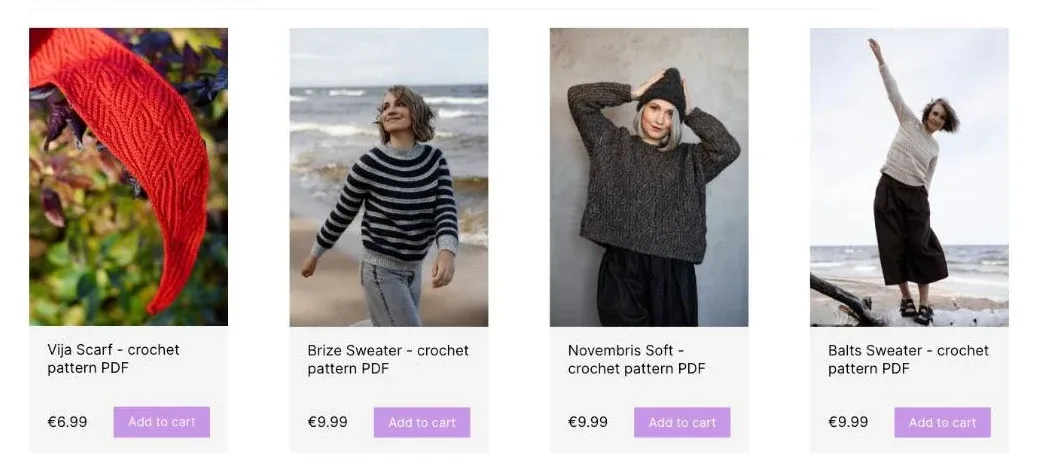
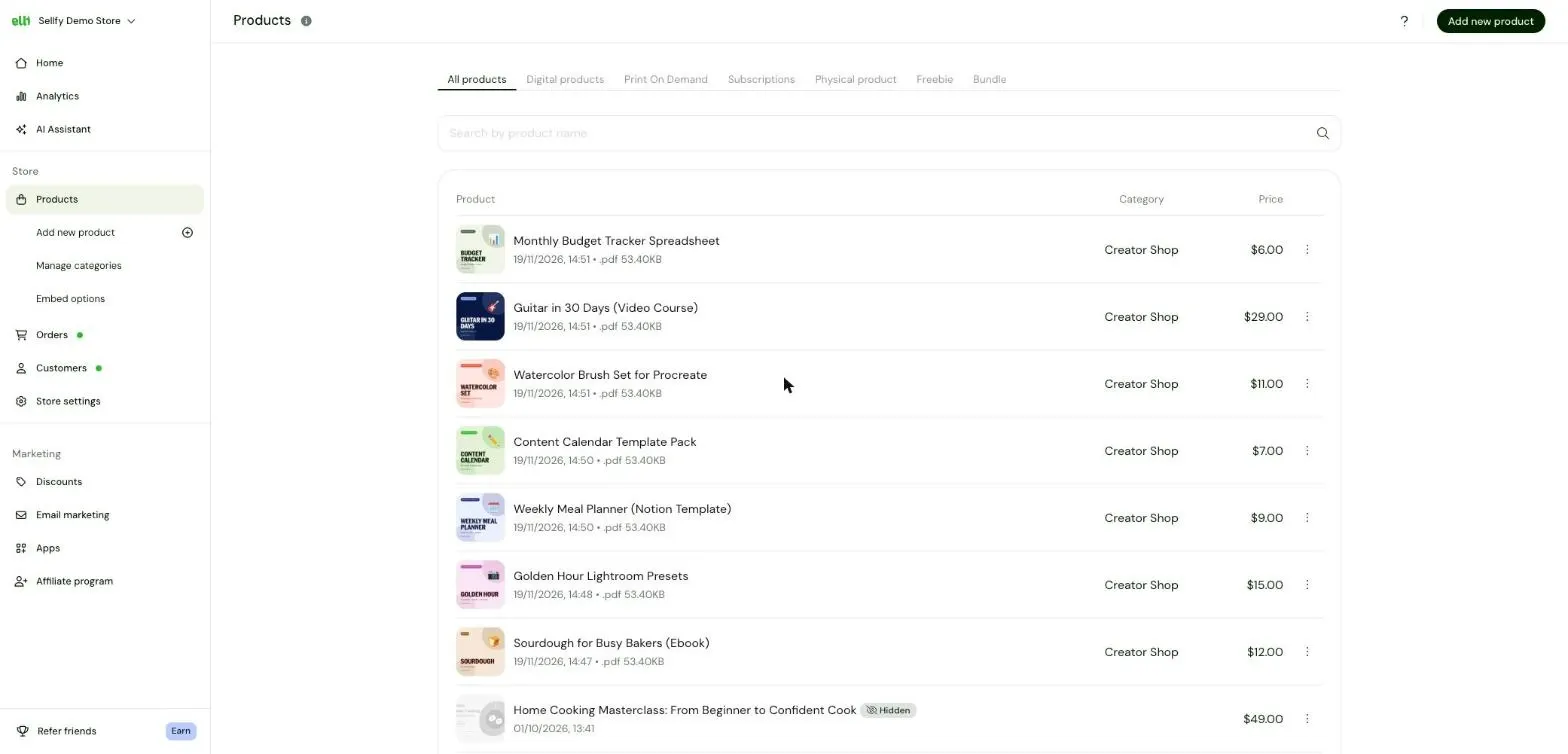
In the Sellfy dashboard, you add each product once: a cover image, a title, a price, and the file buyers get after checkout. The screenshot below shows an example store with several digital products listed.
Your next step: Preview your store on your phone. Once payments are on, buy your own product once to check checkout and delivery.
6. Get your first sale from people who already know you
Use the audience you already have to advertise your online store for free. Start with people who read your posts, watch your videos, or ask for your advice.
Add the link to your bio, pin a launch post, and email your existing subscribers. You can also share the offer in one community where promotion is welcome.
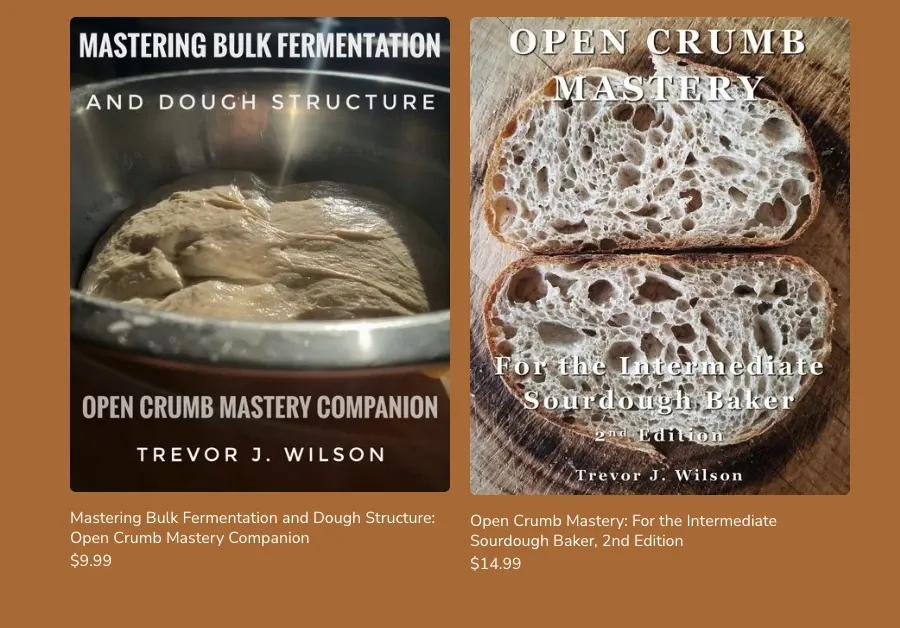
Baker Trevor J. Wilson had around 25,000 Instagram followers when he released his first sourdough ebook. He doesn't run paid ads, and he sold more than 1,000 copies in the first week, over $11,000 in sales.
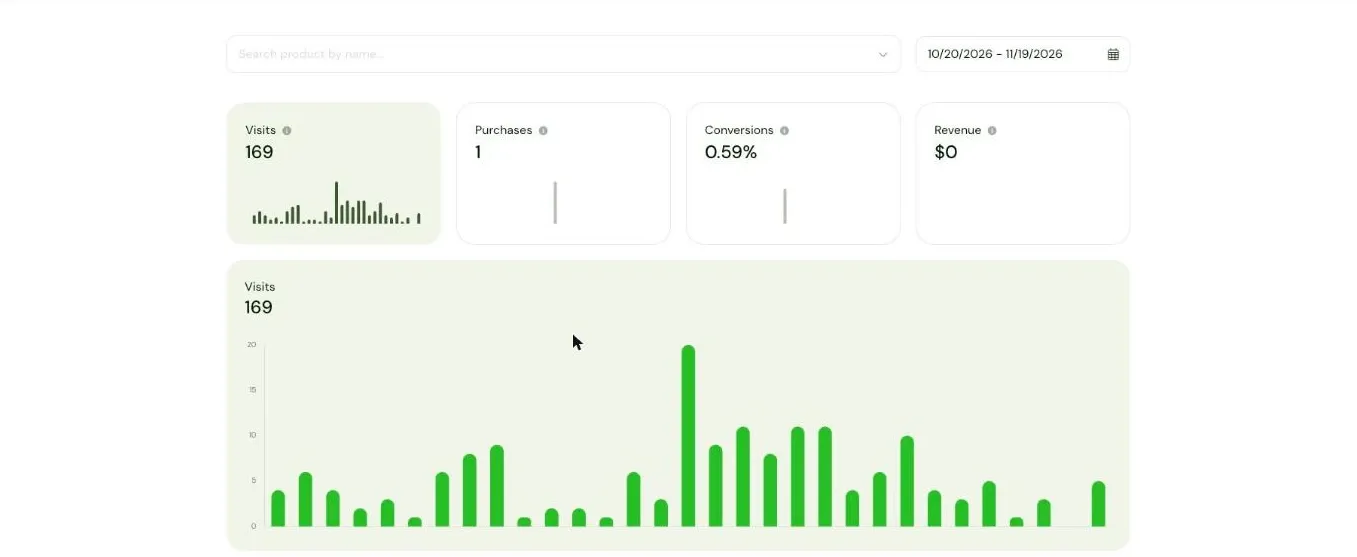
Once you start sharing your link, your Sellfy dashboard shows how many people visit your store each day. The chart below is an example of what that looks like.
We looked at where Sellfy sellers' revenue came from between October 2025 and October 2026. The largest share, 52.5%, came from visits recorded as "Direct": when buyers open a store directly or the source of their visit can't be tracked. Google Search brought 15.4%, YouTube 7%, and Instagram about 6%.
Among sellers who signed up in that period and made at least one sale, the median time from signup to their first sale was 3.6 days. Stores with no sales aren't included in that figure, so your first sale may take longer.
Share of new sellers who made at least one sale, by days since signup
- Within 7 days
- 62.6%
- Within 30 days
- 87.1%
Your launch post is just the start. To promote your online store for free, show the product in use, answer questions, and share a useful preview. Our guides to promoting products on social media and audience monetization cover more ways to reach buyers.
Your next step: Publish one post showing what your product helps people do, with a direct link to buy it.
7. Give away a free product to build your list
A free lead magnet gives people a useful sample of your work. Offer a download related to your paid product, ask for consent to send marketing emails, and follow up with a relevant offer using email marketing tools. For example, someone who downloads a free sample can receive an email explaining what's included in the full version.
Nurse and tutor Ally offers a free nursing guide on her Sellfy store. Everyone who downloads it gets three follow-up emails with a discount code for the full study guide, and she says the sequence "really increased sales."
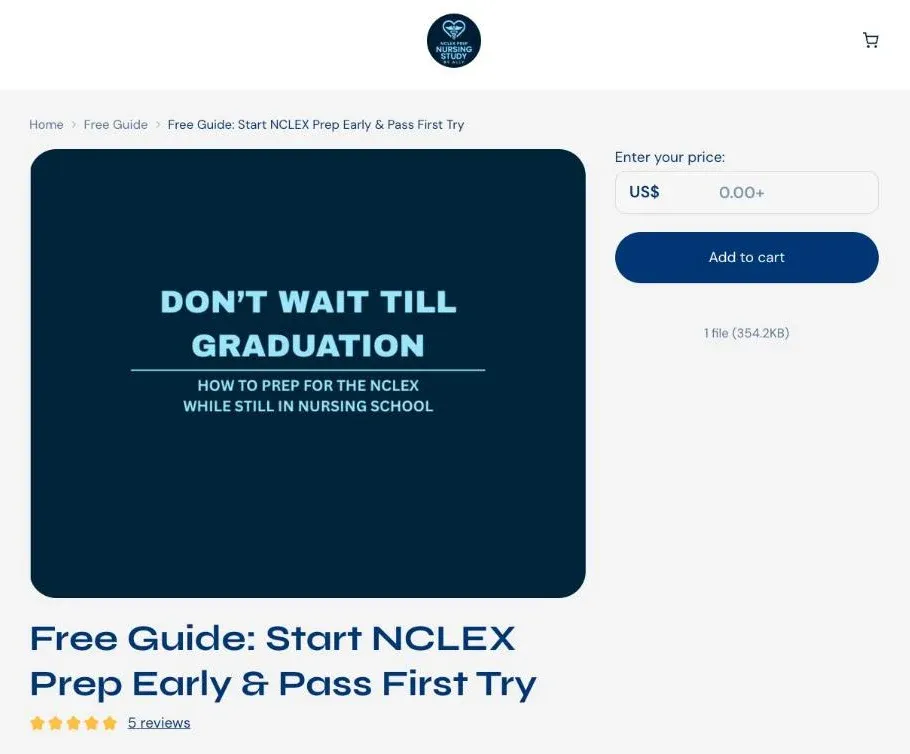
Stores that give something away also earn more. Between October 2025 and October 2026, Sellfy stores with at least one free product had a median revenue of $1,280, compared with $350 for stores without one. They also had a median of 40 paying buyers versus 9, and more repeat buyers (26% vs 16%).
This doesn't prove the freebie caused the difference, and most free downloads won't turn into sales right away. About 3.5% of people whose first order was a free download later bought from the same store, a median of 15 days later. The real value is the email list you build along the way.
Your next step: Create a small sample of your paid product and write one follow-up email for subscribers who download it.
8. Reinvest your first $100
Use your first earnings to improve what's already working. Start with a custom domain, then consider a paid plan when it costs less than the platform fees you're paying. Add an email tool when you need features your store doesn't include. You don't have to spend the whole $100 at once.
Save ads for later, once unpaid promotion has brought in sales and shown that people want your offer. A small ad test is more useful when you already know which product and message get a response.
Your next step: List these expenses in order and choose the first one your earnings can comfortably cover.
Mistakes that keep no-money stores at $0
A small budget doesn't have to hold you back, but spending time and money on the wrong things can. Here are a few common mistakes to avoid when launching your first store.
- Never publishing your product. You can spend weeks tweaking the design without finding out whether anyone wants it. Once the product does what you promise, publish it and use buyer feedback to improve it.
- Launching ten products at once. Each product needs time to create, explain, and promote. Start with one so you can give it enough attention.
- Expecting the platform to bring buyers. Opening a store doesn't mean people will find it. Share your link and show your audience how the product can help them.
- Paying for ads before your first organic sale. Test your offer with people you can reach for free before spending money on traffic. Use their response to help you improve your product page and message.
- Ignoring fees on free plans. A plan with no monthly charge can still take a cut of every order. Calculate what you'll keep from each sale, including payment processing fees.
- Buying themes, apps, and tools on day one. Use the free design options and features you already have. Pay for extras when there's a specific problem they'll help you solve.
Sellfy is the store builder behind 75K+ creators. One flat monthly fee, and no commissions on your sales.
FAQ
What is the cheapest way to set up an online store?
The cheapest way to sell online is to use a free selling plan, a free subdomain, and tools you already have. Start with one digital product and share the link with your audience. A free trial can help with setup, but check whether it lets you accept payments.
Can you start an online store for free?
Yes, you can start an online store with no upfront platform costs by choosing a free selling plan. You'll still pay a platform fee on each sale and a payment processing fee, so compare both before choosing where to sell.
How long does it take to make your first sale?
Among sellers who signed up for Sellfy between October 2025 and October 2026 and made a sale, 62.6% made their first sale within seven days of signup, and 87.1% within 30 days. These figures exclude sellers with no sales, so they don't predict how quickly your store will sell.
Can I start an online store without inventory?
Yes, you can sell online without buying or storing inventory. Digital products are delivered as downloads, with no physical stock. Print-on-demand providers make and ship items after customers order. Affiliate marketing also requires no inventory: you earn commissions by referring buyers to another business rather than selling through your own checkout.
Do I need an LLC to sell online?
No, you generally don't need an LLC to start selling online in the US. If you operate alone without forming another business entity, you're usually a sole proprietor. Local registration, permit, and tax requirements may still apply. See the SBA's business setup guidance. This is general information, not legal advice.
What is the 80/20 rule in ecommerce?
The 80/20 rule suggests that a small share of your products or customers generates most of your revenue. It isn't an exact formula. In the median Sellfy store that made a sale between October 2025 and October 2026, the top product brought in 55% of revenue. Focus on improving and promoting the product people already buy.

Tips & Tricks

Tips for creators
Join thousands of creators receiving sales tips, marketing resources, and inspiring stories. No spam, pure value.