- tips & tricks
- |By Aleksey Haritonenko, Last Updated:
How to Sell Digital Downloads with PayPal in 2026 (Step-by-Step Guide)
Selling digital downloads with PayPal can be a highly profitable move, but the setup is full of small traps no one warns you about. Here is my 4-step process that works in 2026, including the fees, holds, and Seller Protection gaps I wish someone had explained to me before I started.
TL;DR: Yes, you can sell digital downloads with PayPal. You need a PayPal Business account plus a digital delivery platform like Sellfy, since PayPal does not host or deliver files. Set up the account, connect your platform, upload your products, and share your link. Setup takes under 30 minutes.
Sellfy is the store builder behind 75K+ creators. One flat monthly fee, and no commissions on your sales.
Step 1: Set up your PayPal Business account
Now for the meat and potatoes of how to sell digital downloads with PayPal.
First, sign up for a PayPal Business account at PayPal.com. It is free, takes about 5 minutes, and gives you tools a Personal account cannot: branded invoices, dispute resolution, multi-user access, and platform integrations. I tested both account types, and Business is the only realistic option for any creator selling more than a handful of files.
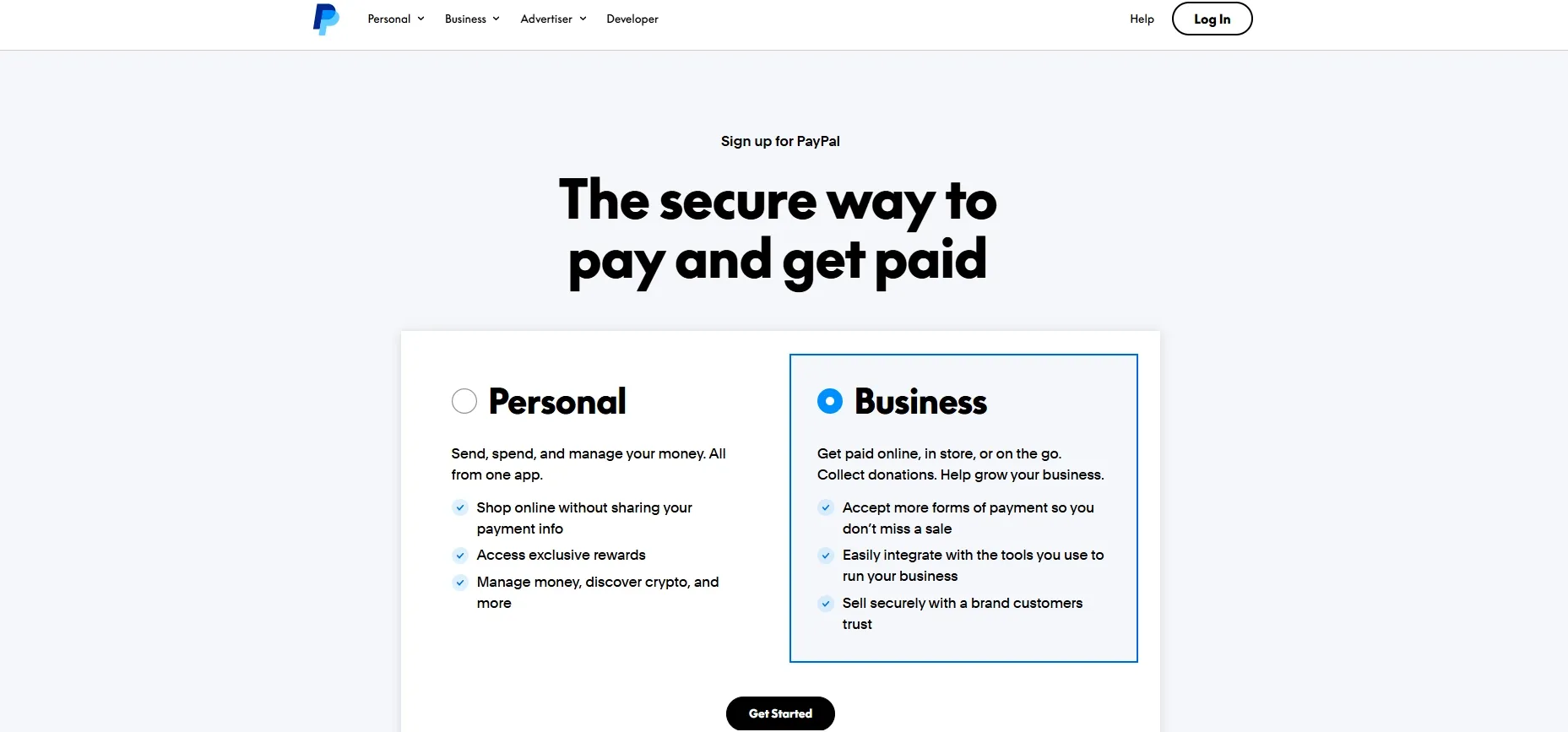
Personal vs Business: which one do you need?
For a serious digital download business, you need a Business account. Personal accounts have lower receiving limits, cannot operate under a brand name, and offer almost no dispute tools. Business is free to open in most countries, but some markets (India, Brazil, parts of LATAM) require a registered legal entity before unlocking commercial features.
| Feature | Personal | Business | Payments Pro |
| Monthly fee | $0 | $0 | $30 |
| Operate under brand name | No | Yes | Yes |
| Branded checkout | No | Yes | Yes |
| Dispute tools | Basic | Full | Full |
| Custom card processing | No | No | Yes |
| API access | Limited | Yes | Full |
| Country eligibility | Most markets | Most (some require legal entity) | US only |
PayPal fees for digital sellers
PayPal Goods and Services is the fee bucket every digital seller falls into. For US Business accounts, PayPal Checkout (the integration most delivery platforms use) costs 3.49% + $0.49 per transaction, per PayPal's merchant fees page updated May 19, 2026. International sales add 1.50%, plus up to a 4% currency conversion spread. There are a few legit ways to lower these fees if they start eating into your margins.
You cannot legally use Friends and Family to accept payments for goods. PayPal bans it in the User Agreement. F&F has zero buyer or seller protection, no chargeback rights, and using it commercially is the fastest way to get your account permanently limited. I have read enough Reddit horror stories to never recommend it.
Current US Business rate snapshot:
| Transaction type | Rate |
| PayPal Checkout | 3.49% + $0.49 |
| Standard Credit/Debit Card | 2.99% + $0.49 |
| Send/Receive Money for G&S | 2.99% |
| International add-on | +1.50% |
| Currency conversion spread | Up to 4% |
| Standard dispute fee | $15 |
| Chargeback fee | $20 |
Micropayments rate for low-priced items (under $10)
If you sell sub-$10 products (single PDFs, single Lightroom presets, stock photos, one-off templates), apply for PayPal's Micropayments rate. For US accounts it is 4.99% + $0.09 per transaction.
On a $5 sale, standard fees take $0.66 (13.2%). Micropayments take $0.34 (6.8%). Across 1,000 sales a month, that is roughly $320 you keep.
The catch: Micropayments only applies to ONE PayPal account. If you also sell $50 courses or bundles, the standard rate is cheaper on those.
Step 2: Connect a digital delivery platform
PayPal won't deliver your files. It is a payment processor, not a fulfillment system. To send a PDF, ZIP, video, or audio file to a buyer automatically after checkout, you need a digital delivery platform sitting on top of PayPal. I tested four of them in the last year, and the right pick depends on your catalog size, file weight, and how much customization you actually need.
Best delivery platforms for PayPal sellers (comparison)
| Platform | Fees on top of PayPal | File size limit | File protection |
| Sellfy | 0% on Starter ($29/mo, $10K/yr cap) and above | 10 GB per file | PDF stamping, unique links |
| Payhip | 5% Free, 2% Plus ($29/mo), 0% Pro ($99/mo) | 5 GB per file | Unique links |
| SendOwl | 0% on flat monthly plans (from $9/mo) | 5 GB per file | PDF stamping, unique links |
| DIY (Google Drive) | 0% (your hours) | 5 TB | None |
What I found in practice:
- Sellfy was the fastest to launch. I had a working store with 3 products, a connected PayPal Business account, and automated EU VAT in under 5 minutes. The store builder, print-on-demand, and subscriptions all sit in the same dashboard, which I did not realize I needed until I had it.
- Payhip's free tier is great for testing. The 5% platform fee adds up once you cross 50 sales a month, so most serious sellers upgrade to a paid plan or migrate.
- SendOwl is a clean fit if you only need delivery and do not want a store builder.
- DIY with Google Drive looks free until you spend two hours on a single refund dispute, or Google flags your link sharing as suspicious and locks the folder. I would not recommend it for anyone planning to sell more than a few files.
Sellfy is the store builder behind 75K+ creators. One flat monthly fee, and no commissions on your sales.
Connecting Sellfy to PayPal in under 2 minutes
Sellfy is the platform I use most often, so here is the exact connection flow. The steps are identical on the free trial and on paid plans.
- Sign up at Sellfy.com (email or Google).
- Go to Store Settings, then Payment Options.
- Paste your PayPal Business email in the PayPal field.
- Save. You are live.
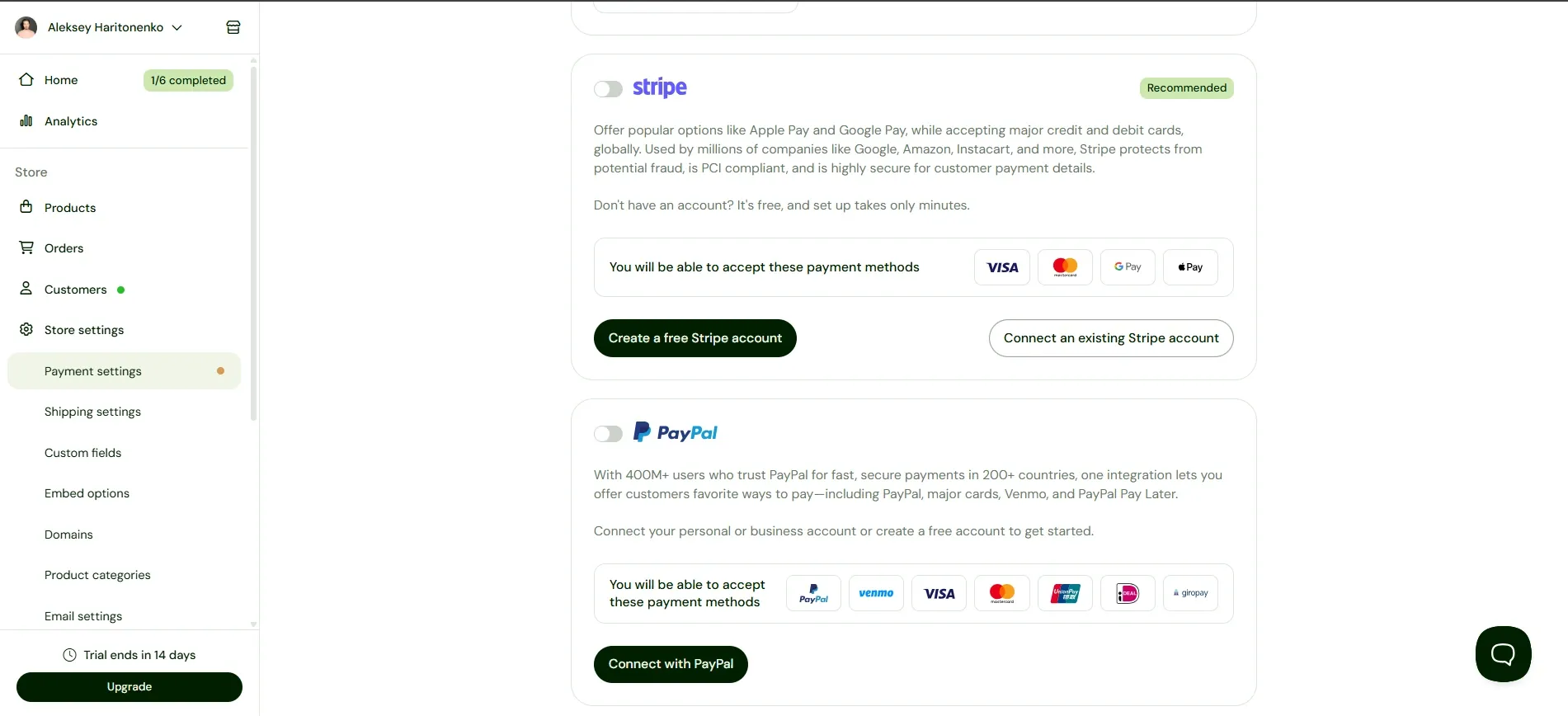
Payments hit your PayPal balance immediately, not on a payout schedule. Withdraw to your bank, or use the PayPal Business Debit Mastercard.
Step 3: Add your products and set up automatic delivery
Once PayPal is connected, upload your files. In Sellfy:
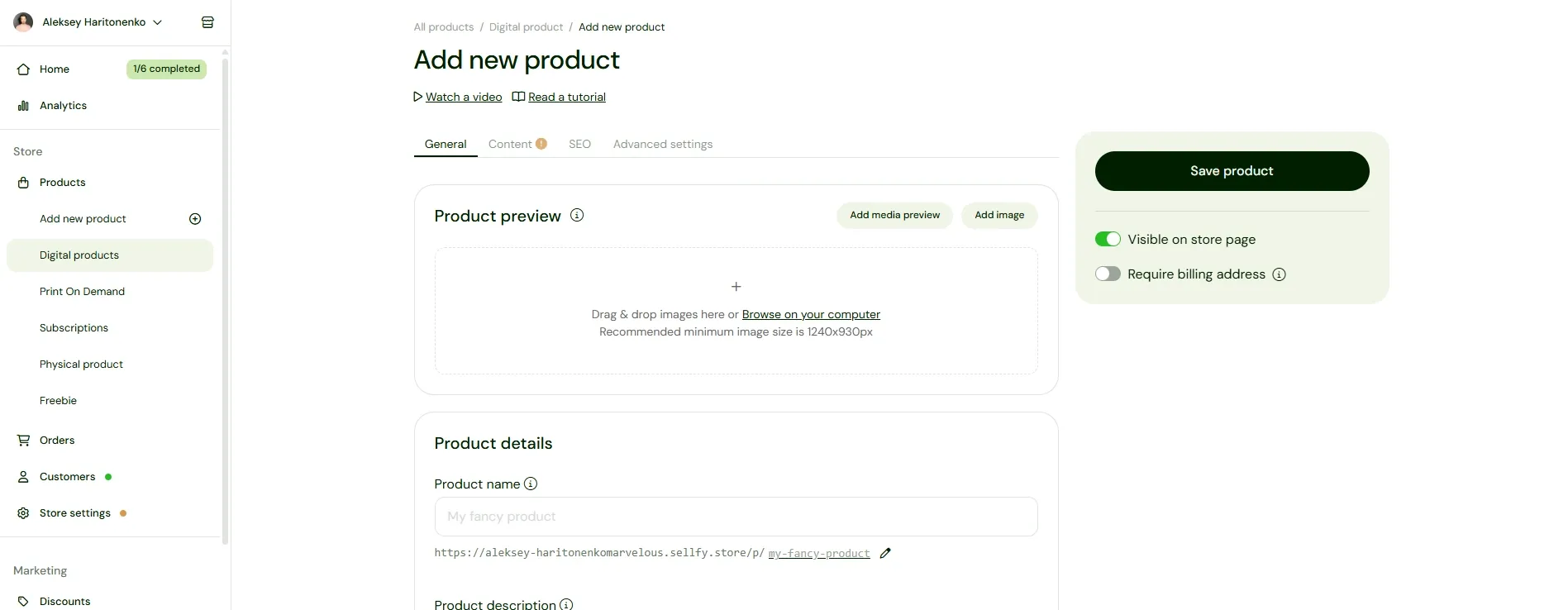
- Add product, then upload the file (PDF, ZIP, MP3, MP4, EPUB).
- Set the price and currency.
- Set a download limit (I use 5 downloads per buyer to slow link sharing) and a 7-day download window.
- Save and preview the product page.
Delivery is automatic. The moment a buyer's PayPal payment clears, they get a unique download link in their email and on the order confirmation page. No manual sending. No "did you get my email?" follow-ups. If you're mostly selling PDFs, there's more to know about stamping, licensing, and secure delivery.
Step 4: Share product links and embed buy buttons
The fastest way to sell with PayPal is to put your store link where your audience already scrolls. The highest-converting placements I have seen in 2026:
- TikTok bio link. TikTok Shop made up nearly 20% of US social commerce in 2025, with sales forecast to top $20 billion in 2026. Add your Sellfy link in your bio and pin a video that explains the product.
- Instagram bio plus Instagram Shop. Standard Sellfy link in the bio, plus apply for Instagram Shop if you bundle merch with downloads.
- Linktree, Beacons, or Lnk.bio. Multi-link hubs let you list every product separately if you sell more than a handful.
- YouTube description and pinned comment for tutorial creators.
- X (Twitter) pinned post with a Sellfy product card.
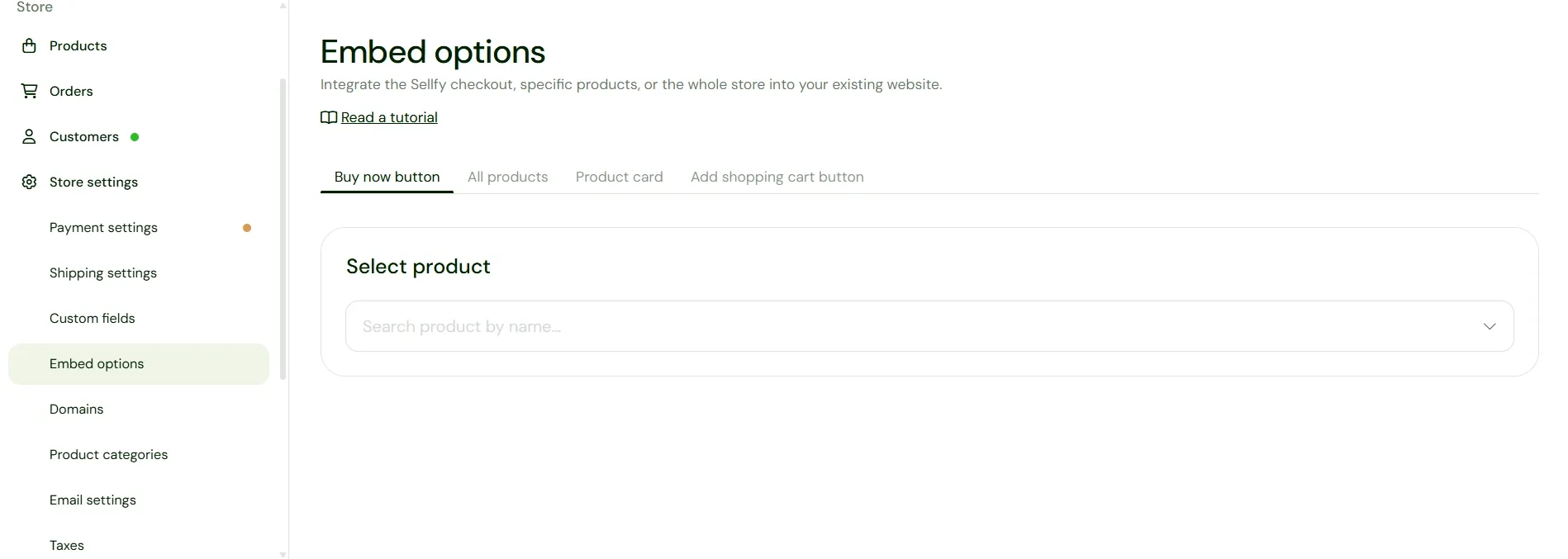
You can also embed a Buy Now button or the full store on any website. Sellfy gives you the embed code under Embed Options. Paste it into WordPress, Webflow, Squarespace, Ghost, or any HTML editor.
What PayPal doesn't tell digital sellers
PayPal's marketing pages do not highlight the three risks every digital seller eventually hits. I have hit all three.
PayPal Seller Protection and digital goods: the Goods and Services gap
PayPal Seller Protection explicitly excludes most digital goods. PayPal's own Seller Protection page lists "digital goods (music, computer game downloads, and licenses for digital content)" as ineligible, and the User Agreement confirms it with a narrow exception for intangible goods under specific criteria. Translation: if a buyer files an "item not received" or "significantly not as described" claim on your PDF or ebook, you are unlikely to win, because PayPal cannot ask you for a tracking number on a file. Buyer Protection still applies. Yours does not.
21-day holds on new PayPal Business accounts
PayPal places a 21-day "Payment Review" hold on new accounts, accounts with sudden volume spikes, and accounts in higher-risk categories (digital downloads is one). It is not a punishment; it is risk control.
How to reduce holds:
- Fully verify your account (bank, email, phone, ID).
- Build a steady sales pattern instead of spiking from $0 to $5,000 overnight.
- Encourage buyers to leave positive feedback in PayPal.
- Avoid refund spikes.
Most new sellers see holds lift after roughly 90 days of clean activity.
Chargeback exposure for digital products
PayPal digital goods chargeback is harder to defend because you cannot prove physical delivery. The buyer's card issuer asks for a tracking number you do not have.
To defend a digital chargeback, gather:
- The buyer's IP address at purchase (Sellfy logs this).
- Download timestamp and IP from your delivery platform.
- The PayPal transaction receipt.
- Any buyer communication.
Even with all of that, you will lose roughly half of digital chargebacks. PayPal charges a $20 chargeback fee on top of the refunded amount, per the merchant fees page. Set aside 1 to 2% of revenue for chargeback losses once you scale.
Get started
PayPal still moves more digital-download payments than any other processor, with 439 million active accounts across approximately 200 markets as of Q1 2026 (PayPal Q1 2026 earnings release). Pair it with a platform that handles delivery, taxes, and license control, and you can launch in an afternoon.
Not sure what to launch first? There are plenty of ideas for digital products to sell, and if you're leaning toward written content, it's worth looking at where to sell ebooks.
Sellfy is the all-in-one I keep coming back to. Start free at sellfy.com/sell-downloads/, check pricing, or jump straight into the free trial.
Sellfy is the store builder behind 75K+ creators. One flat monthly fee, and no commissions on your sales.
FAQ
Can you sell digital products through PayPal?
Yes. You need a PayPal Business account and a digital delivery platform like Sellfy, Payhip, or SendOwl, because PayPal does not host or deliver files. Sellers in the ~200 markets PayPal supports can accept payments for ebooks, PDFs, presets, templates, music, video courses, and most other digital downloads.
How much does PayPal take from a $100 sale?
About $3.98 on a US PayPal Checkout transaction (3.49% + $0.49), per PayPal's merchant fees page. The Micropayments rate (4.99% + $0.09) is cheaper on sales under about $10. International sales add 1.50%, plus up to 4% currency conversion spread.
What's the best platform to sell digital downloads with PayPal?
I recommend Sellfy for an all-in-one store, delivery, and VAT solution, Payhip if you want a free tier to test, and Easy Digital Downloads if you already run WordPress. If you're specifically working out how to sell ebooks online with PayPal, any of the three handles EPUB and PDF delivery natively. The right one depends on your catalog size and budget.
How do I avoid the 3% fee on PayPal?
You can't fully avoid PayPal Standard fees. If your products sell for under about $10, apply for the Micropayments rate (4.99% + $0.09 in the US), which beats Standard on small tickets. On bigger products, Standard is your floor. Anyone promising lower PayPal fees is either using Stripe, Square, or breaking PayPal's terms.
Can I use a Personal PayPal account to sell?
Technically yes for tiny volume, but PayPal does not allow Personal accounts to act as a business. You lose branded receipts, dispute tools, multi-user access, and most delivery platform integrations. Account holds also hit Personal accounts faster. Open a Business account from day one. It is free and takes 5 minutes.
Is PayPal safe for selling digital downloads?
Safer for buyers than for sellers. PayPal encrypts transactions and offers Buyer Protection, which builds buyer trust. But Seller Protection excludes most digital goods, so you carry the chargeback risk. Use a delivery platform that logs buyer IPs and download timestamps as evidence. PayPal is fine to use, just not your only safety net.
Why is PayPal holding my digital-goods payment?
PayPal places 21-day "Payment Review" holds on new accounts, accounts with sudden volume spikes, and accounts in higher-risk categories (digital downloads counts). It is a risk control, not a penalty. Fully verify your account, keep volume steady, and most holds release after about 90 days of clean activity.
Can I sell PDFs, ebooks, and templates with PayPal?
Yes. PDFs, ebooks, planners, Notion templates, Canva templates, and design assets are all allowed under PayPal's Acceptable Use Policy. Pair PayPal with a platform that delivers the file automatically post-purchase. For the deeper walkthrough, see Sellfy's guide on how to sell PDFs online.
PayPal vs Stripe: which is better for digital downloads?
PayPal wins on buyer trust and global reach (439 million accounts). Stripe wins on lower fees and a cleaner native checkout when you control the front-end. Most serious digital sellers offer both, since roughly 20 to 30% of buyers actively prefer one over the other. The honest answer is usually "both."
Can I sell digital downloads with PayPal on Shopify or WordPress?
Yes. On Shopify, enable PayPal in payment settings and add a digital delivery app like Sky Pilot or SendOwl. On WordPress, use Easy Digital Downloads or WooCommerce with PayPal. Sellfy is the simpler all-in-one alternative if you do not want to host files, maintain plugins, and patch your own site.

Tips & Tricks
Tips for creators
Join thousands of creators receiving sales tips, marketing resources, and inspiring stories. No spam, pure value.