- sellfy university
- |By Susanna Puusaag, Last Updated:
How to make and sell Lightroom presets (desktop + mobile)
If you are skilled at photo editing, you can make money selling Lightroom presets. Social media creators and businesses constantly seek a consistent aesthetic, so packaging your custom adjustments into downloadable files and selling them allows you to monetize your style with unlimited scalability through an automated storefront.
Can you make money selling Lightroom presets?
Yes, you can sell Lightroom presets by converting your unique editing style into downloadable files. They're one of the most beginner-friendly digital products to sell, and the global growth of the photo and creators' markets keeps demand high.
According to statistics, the global photo editing software market was valued at $1.20 billion in 2025 and continues to grow as more people enter the creative space. Additionally, the number of active social media users reached 5.79 billion in April 2026. A large portion of this demographic relies on visual-first platforms like Instagram and TikTok, which drives a constant demand for unique, consistent aesthetics. Many photographers and digital creators are successfully tapping into this vast audience by focusing on specific niches — presets are just one of many ways of making money as a photographer.
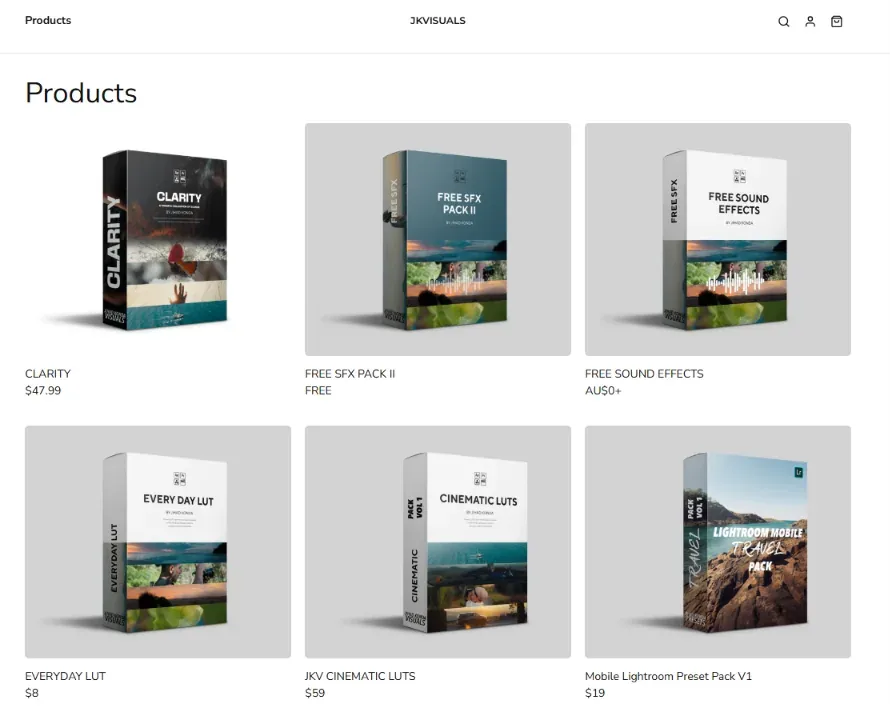
Take award-winning underwater photographer Tobias Friedrich, for example. He managed to turn his highly specialized ocean editing styles into a steady income.
"It took a lot of time and effort for me to create my Lightroom Presets," Friedrich explains, "so it's really nice to be able to just put them online and let Sellfy's automated process take care of it."
Other creators, like Christian Maté Grab and Keydrin, also generate a steady income flow, combining their unique styles with direct social media marketing.
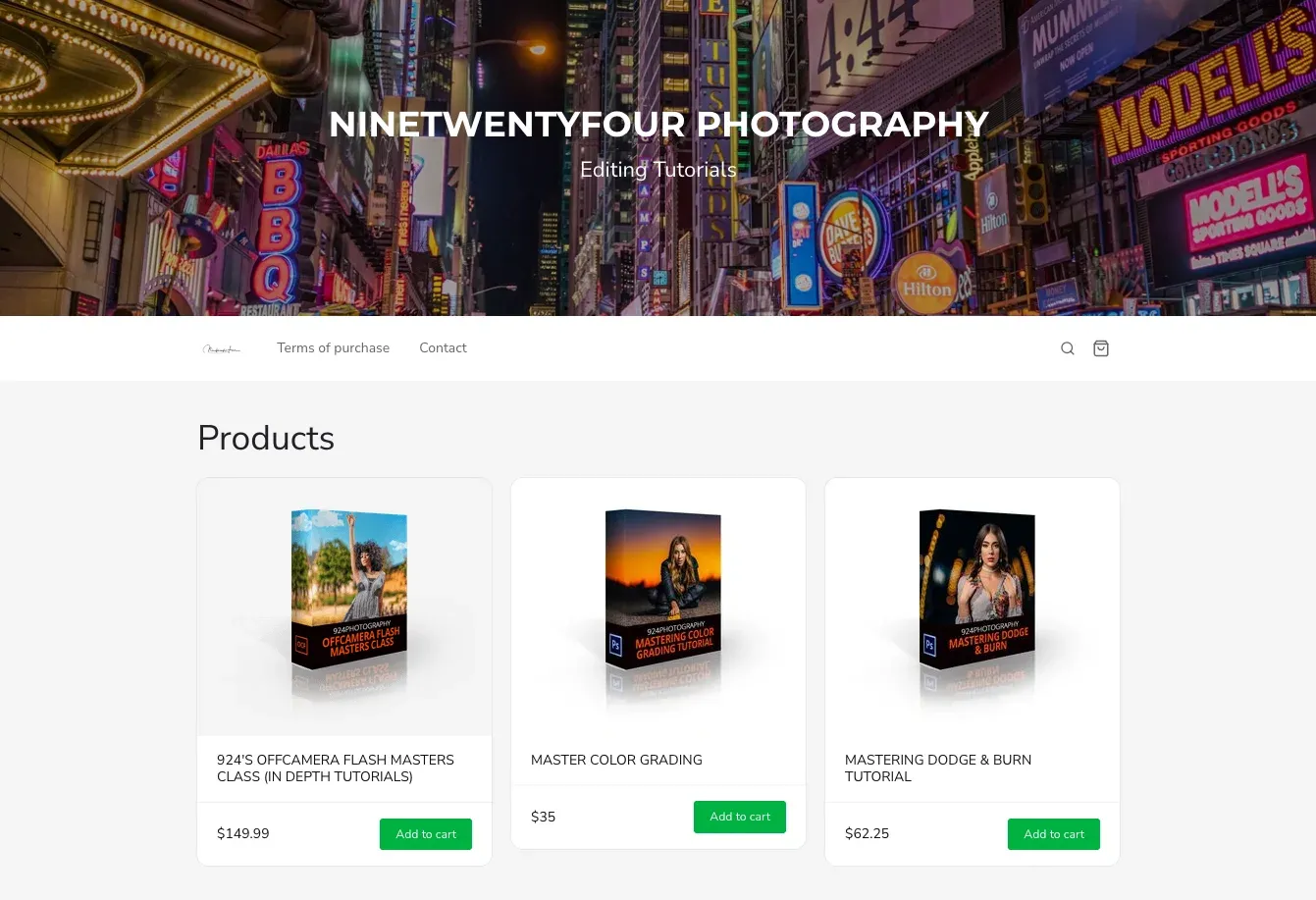
How much can you earn selling presets?
It can be a few hundred dollars a month or thousands of dollars with a big product launch, but your total revenue depends on your niche, your price point, and your marketing.
Most single preset packs sell for $20 to $35, while larger bundles can easily sell for $100 or more. Because you only have to create the files once, every unit sold after that is purely profit.
Sellfy is the store builder behind 75K+ creators. One flat monthly fee, and no commissions on your sales.
How to make Lightroom presets (desktop + mobile)
To create presets in Lightroom that sell, you need a repeatable process that works across different types of photos. I have found that the most profitable presets don't just change colors, they solve a specific lighting or tone problem for the buyer.
Find your style and specialty
Before opening your editing software, look at your existing portfolio to find your signature look. The best way to build a loyal following is to focus on a clear aesthetic or photographic niche.
Instead of using generic filters, choose a style that fits your workflow:
- Aesthetic mood. Decide if your visual brand is dark and moody, warm and vintage, or bright and airy.
- Subject specialty. Focus on clear niches like portrait skin-tone tuning, landscape enhancement, or real estate photography.
- Problem-solving packs. Target difficult shooting conditions, such as overcast sky corrections, sunset warmers, or low-light indoor environments.
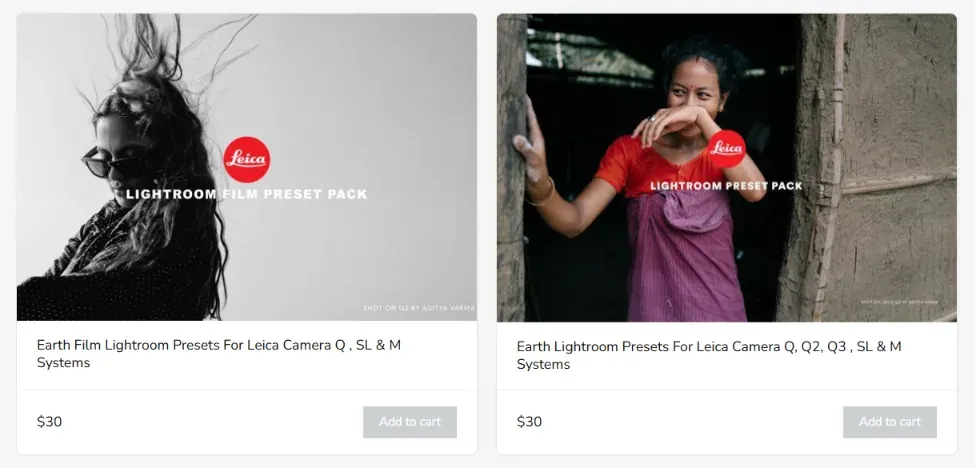
Edit your photo
To build a professional desktop preset, you need Adobe Lightroom Classic. While you can use the mobile version for personal edits, the desktop version is required to build highly flexible, cross-platform assets.
Avoid over-editing sliders like exposure or saturation, as these vary wildly between different cameras. Instead, look for subtle shifts in tone.
Save your preset the right way
Once your image looks exactly how you want it, you need to save the adjustments into a reusable configuration file. The secret to making a preset compatible with other photographers' images is hiding the exposure and white balance settings.
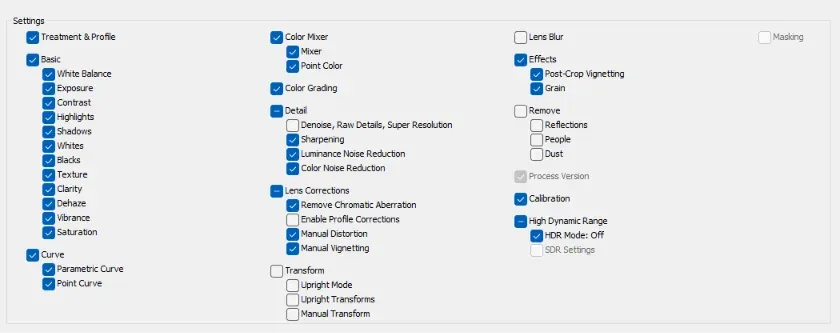
- Click the + icon next to the Presets panel on the left side of the screen and select Create Preset.
- Name your preset using a descriptive title (for example, "Warm Editorial - Base").
- In the settings checklist, leave all the settings you want to be saved checked.
- Click Create to save the file in your user library.
Name and organize your presets
When customers upload your files into their workspace, they want a consistent, high-quality experience. Think about an open naming structure that combines your brand name with the desired aesthetic.
For example, use a system like "BrandName - Desert Gold 01" and "BrandName - Desert Gold 02 (Deep Shadows)". Group similar styles together into a dedicated folder within Lightroom so they export as a unified collection.
Make presets for Lightroom Mobile (export to DNG)
The mobile preset market is massive because millions of casual creators edit entirely on their phones. To cater to mobile buyers, convert your desktop .xmp files into .dng mobile-compatible formats.
- Import a raw or clean JPEG photo into your desktop Lightroom app.
- Apply your newly created preset to that image.
- Click File > Export.
- In the export settings, change the file type format to DNG.
- Save the image into a dedicated project folder.
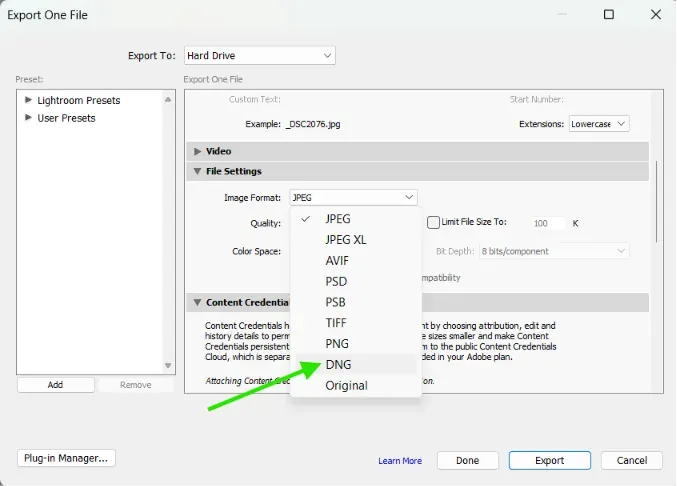
When mobile creators purchase your pack, they will import these .dng images directly into their Adobe Lightroom Mobile app, allowing them to copy and save the embedded settings to their mobile device.
How to sell Lightroom presets
To build a successful digital store, creating downloadable files is only half of the job. You also need a dedicated sales infrastructure that turns your social media traffic into paying customers without requiring manual file delivery.
What makes a preset actually sell
I have tested various preset packs and noticed a clear pattern. The products that fail are usually rushed edits tested on only one or two photos.
To create a commercially viable product, your preset pack should meet these four criteria:
- Multi-camera versatility. Test your adjustments on 20 to 30 different raw images from Canon, Sony, Nikon and iPhones to make sure the color rendering is consistent.
- Skin tone protection. Ensure your color shifts do not turn human skin unnatural shades of orange or green.
- Complete aesthetic unity. Every file in the pack should feel like it belongs to the same visual family.
- True time savings. Your product must legitimately cut down the buyer's post-production time.
Package your presets into themed packs
People rarely purchase standalone individual presets. Instead, they look for collections that cover an entire shoot or lifestyle theme.
Structure your products into themed collections containing one main signature look and 5 to 8 subtle variations. For example, a "Golden Hour" pack should have variations optimized for bright sunlight, heavy backlight, and deep shade.
When your variations are ready to export, compress the desktop .xmp files and mobile .dng files in a single .zip file for easy digital delivery.
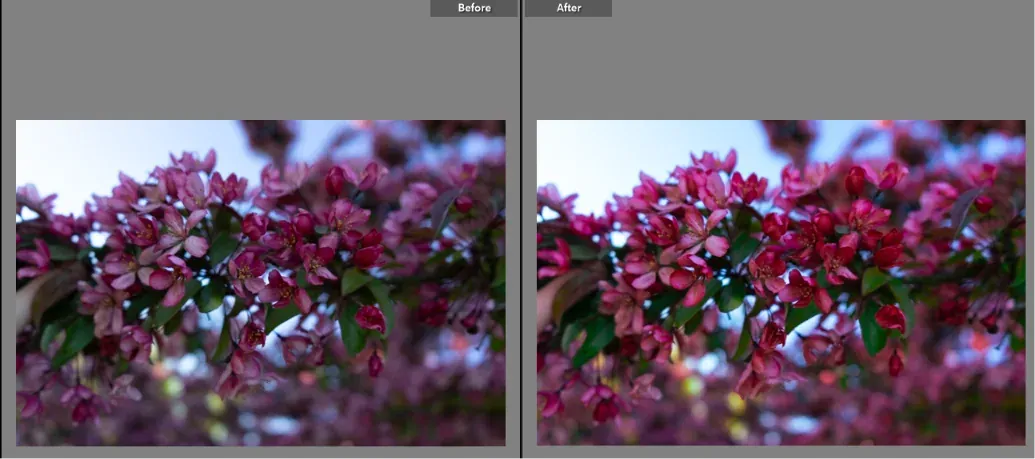
Create before-and-after preview images
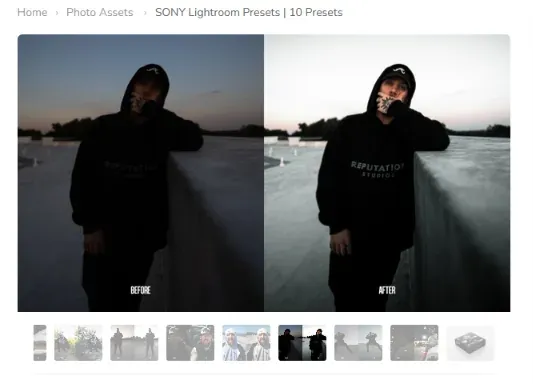
The preview images are your primary sales asset. Since buyers are unable to test the file prior to purchase, the visual demonstration should clearly show how your product will transform.
Create 8 to 12 side-by-side comparison graphics with clean, professional split screens or slider formats. Make sure these previews are relevant to the specific niche of your target audience. If you are selling wedding presets, use real wedding photos rather than random landscape shots.
Along with the previews, always include a brief, simple PDF installation guide inside the download archive. This cuts down on customer service inquiries by showing mobile and desktop buyers exactly where to click to import their files.
How much do Lightroom presets sell for?
Your pricing should be based on the size of the collection and the depth of the editing style. I suggest a tiered pricing strategy to maximize your average order value.
| Product Type | Contents | Average Price Range | Target Audience |
| Single starter preset | 1 preset file | $5 – $10 | Casual mobile hobbyists |
| Standard preset pack | 5 – 10 variations | $20 – $35 | Social media content creators |
| Premium collection | 15 – 25 presets + toolkit | $40 – $70 | Semi-pro event photographers |
| Commercial mega bundle | 50+ presets across themes | $100 – $150+ | Professional studios and agencies |
Using an odd-pricing strategy, such as ending your prices at .99 or .00, helps to maintain a clean, premium brand image. You can also offer a small introductory discount during a product launch to build early sales momentum.
Where to sell your presets (honest comparison)
Choosing where to list your files impacts your profit margins and how you interact with your customers. There are two primary routes: digital marketplaces or an independent storefront.
| Criteria | Independent Storefront (Sellfy) | Creative Marketplaces (Etsy / FilterGrade) |
| Customer ownership | Full access to buyer email lists | No direct access to customer data |
| Transaction fees | Zero transaction fees on standard plans | High percentage cuts per sale (15% – 50%) |
| Traffic source | Direct traffic from your own marketing | Shared marketplace search algorithm |
| Competition level | Zero distractions on your product pages | Competitor listings displayed right next to yours |
| Setup complexity | Minutes to launch, completely automated | Long approval processes or complex product forms |
Marketplaces like Etsy give you access to an existing search directory, but they often treat your creative work as a commodity and force you into price wars with thousands of other sellers. With a dedicated storefront you can build a sustainable business where you have full control over your branding and customer relationships.
Set up your Sellfy store
Setting up your digital storefront requires zero coding experience and takes under ten minutes to launch.
- Create an account. Sign up for a subscription plan on the Sellfy pricing page to access digital product hosting.
- Upload your files. Go to the Products dashboard, select Digital, and upload your zipped preset archive.
- Configure your product page. Add your before-and-after preview images, write a brief description detailing what camera types work best, set your price, and publish the listing.
Your automated storefront handles everything else. When a customer completes a secure payment, the system instantly generates a secure download link and emails it to their inbox, allowing you to run your business passively.
Sellfy is the store builder behind 75K+ creators. One flat monthly fee, and no commissions on your sales.
Market your presets and get your first sales
I wouldn't recommend relying just on passive discovery to generate income. You should actively direct your existing audience or community to your storefront — whether you sell on Instagram, sell on YouTube, or post on TikTok, your store link belongs in every bio and description. Here are a few things that could help you promote presets.
- Before-and-after video shorts. Create TikToks, Instagram Reels, and YouTube Shorts showcasing a real-time screen recording of a photo transforming in one click.
- The free-sample funnel. Offer a single high-quality preset for free in exchange for an email address. Once the user sees the quality of your work on their own photos, use automated emails to offer them the full premium collection at a discount.
- Pinterest lookbooks. Pin high-quality final images linked directly to your store, tagging keywords like "Moody Travel Photography" or "Clean Instagram Feed Aesthetic".
Common mistakes and protecting your presets
To make a digital business work, you need to avoid basic product design mistakes and protect your files from being shared illegally.
Critical design mistakes to avoid
- Over-saturating previews. Making your promotional images look unrealistic might get initial clicks, but it leads to immediate refund requests when buyers realize the preset breaks their actual photos.
- Ignoring mobile compatibility. Skipping the DNG conversion means you lose out on the massive mobile creator market. Always offer both versions in your pack.
- Launching to zero audience. Do not wait until your store is live to start talking about your editing process. Share your behind-the-scenes editing workflow weeks before the official launch to build anticipation.
File protection and digital rights
Lightroom presets are configuration data files, meaning they are easy to copy and share online. While you cannot completely prevent digital piracy, you can implement clear safeguards to minimize your asset theft.
Watermark your promotional preview graphics to prevent other sellers from stealing your marketing images. Include a clear, legally binding plain-text usage license inside every zip folder, stating that buying the file grants a single-user license and explicitly forbids unauthorized file sharing, reselling, or redistribution.
Get ready to make money with Lightroom presets
Converting your unique visual style into automated digital assets eliminates production overhead, shipping headaches, and inventory restrictions. To maximize your preset sales, remember this simple formula:
- Stick to a well-defined niche. Create highly specific packs that solve a real visual problem or fit a targeted photography style.
- Make visuals the priority. Spend time building high-quality, clear before-and-after comparison graphics to prove your product works.
- Automate your workflow. Use a dedicated platform like Sellfy to instantly handle secure file delivery and collect payments without lifting a finger.
Once you put in the initial time to build and test your collections, your storefront handles the rest. You can step away from manual editing and watch your hard work turn into a steady stream of income.
FAQ: Making and selling Lightroom presets
Can you make money selling Lightroom presets?
Yes, you can absolutely make money selling your presets online. If you understand how to use Lightroom and know how to showcase your work on social media, you can turn your editing style into a reliable source of income. Many digital creators use automated storefronts to sell their custom styles to a global audience passively.
Where can I sell my Lightroom presets?
You can list your presets on creative marketplaces like Etsy, FilterGrade, or Creative Market, or build your own independent storefront using Sellfy. While marketplaces give you access to an existing search directory, they also take massive cuts of your sales. I recommend Sellfy because it offers zero transaction fees and gives you full control over your customer lists.
How much do Lightroom presets sell for?
On average, standard preset packs sell for $20 to $35, while single starter presets go for $5 to $10. If you bundle multiple themes together into a massive commercial collection, you can easily command $100 or more. Because digital products cost nothing to duplicate, you keep almost all of the revenue as pure profit.
Do people buy Lightroom presets?
Yes, people buy them constantly to save time and keep their social media feeds looking uniform. There are more than 5.79 billion active social media users globally, and the demand for quick, professional-looking visuals is skyrocketing. Influencers, companies, and enthusiasts are more than happy to spend money on pre-made solutions that save them the trouble of manually editing photos.
How do I create my own preset in Lightroom?
You can create your own preset by opening a photo in Lightroom on your computer and moving the sliders until it looks the way you want it to. Click the + icon in the Presets panel, select Create Preset, name your file, and choose the settings you want to save. For step-by-step instructions, scroll up to our detailed guide on how to make presets.
Are Lightroom presets profitable?
Absolutely. There are no inventory costs or shipping logistics. Once you've invested the initial time and effort to create and test your asset packs, every download link you send to a buyer is pure profit. Your success lies in targeting a clear niche and marketing your files well.
Can ChatGPT create Lightroom presets?
No, ChatGPT cannot generate actual .xmp or .dng configuration files directly. It can, however, write down step-by-step slider settings and color values for you to copy. You still have to manually input those numbers into Adobe Lightroom, tweak them to look good, and save the preset file manually.
Is it legal to sell Lightroom presets?
Yes, it is completely legal to sell Lightroom presets as long as you created the adjustments yourself from scratch. You own the copyright to the specific configuration of settings you design. To protect your business, always include a simple plain-text license inside your product download folder that clearly forbids customers from reselling or sharing your files.

Sellfy University


Tips for creators
Join thousands of creators receiving sales tips, marketing resources, and inspiring stories. No spam, pure value.